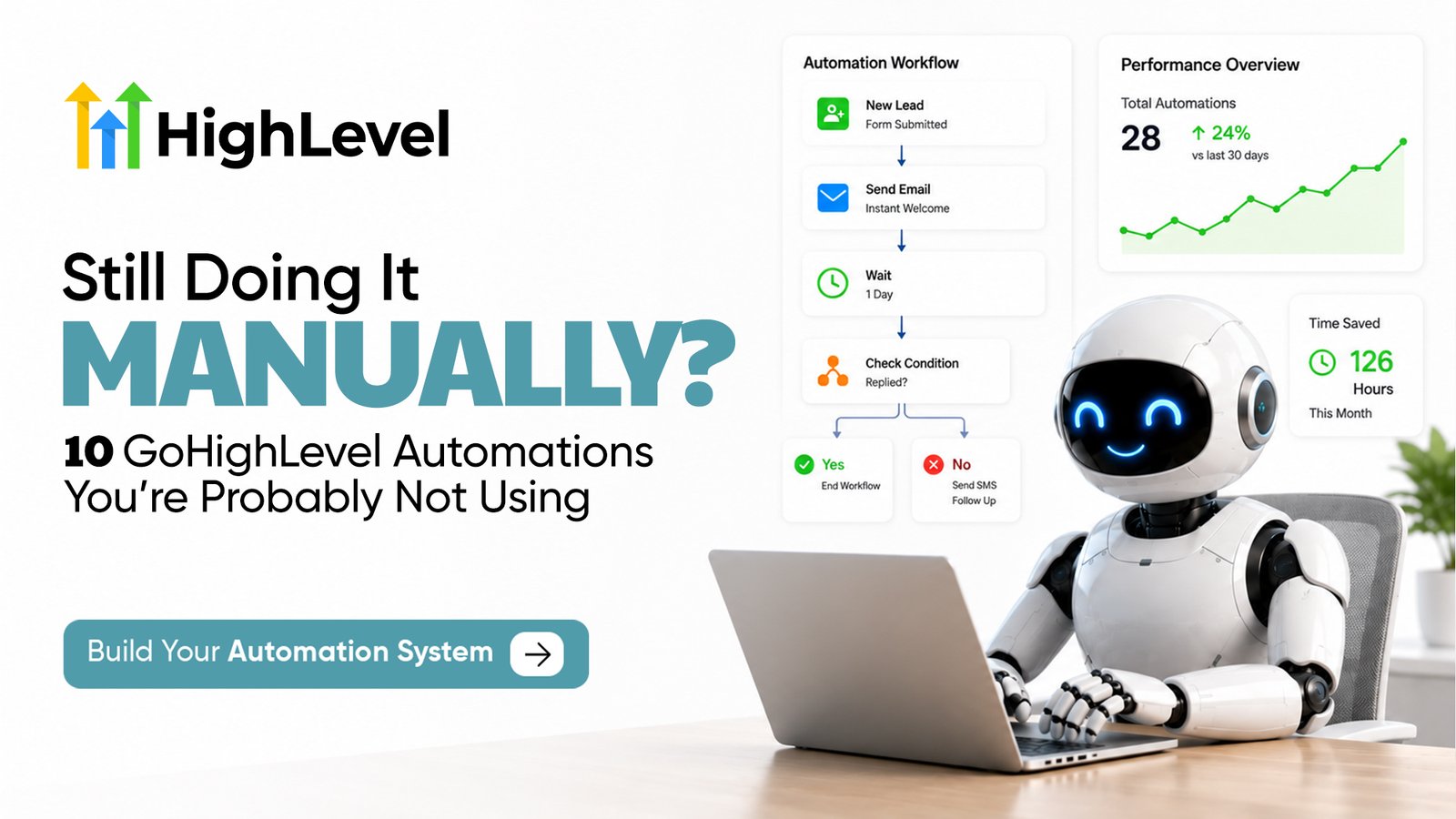
Running a business involves dozens of repetitive tasks, from following up with new leads and sending appointment reminders to updating your sales pipeline, assigning leads, requesting reviews, and onboarding new clients. GoHighLevel automations can handle many of these processes automatically, giving your team a more consistent way to manage leads and customers without relying on someone to remember every next step.
With GoHighLevel, you can build workflows that respond to specific triggers, perform actions, apply conditions, update CRM records, send SMS and emails, manage appointments, and even incorporate AI into your customer journey. In this guide, we’ll look at 10 practical GoHighLevel automations you can use to replace repetitive manual work, including real workflow examples and the technical logic behind them. If you want to build these systems alongside the guide, start your GoHighLevel free trial now.
| TL;DR 1. GoHighLevel automations help businesses replace repetitive manual work with workflows built around triggers, actions, wait steps, conditions, and outcomes. 2. You can automate new lead follow-up, missed-call text back, lead qualification and routing, appointment reminders, sales pipeline updates, old lead reactivation, review requests, no-show recovery, AI lead qualification, and client onboarding. 3. Workflows can react to what a contact actually does. For example, follow-ups can stop when someone replies, appointments can trigger reminders, and payments can move opportunities to Won and start onboarding. 4. If/Else conditions, wait steps, custom fields, pipeline stages, and exit conditions make GoHighLevel workflows more intelligent than simple scheduled email or SMS sequences. 5. The best approach is to automate tasks that are repetitive, predictable, time-sensitive, and rule-based, while keeping sales negotiations, complex support, strategy, and other judgment-based conversations human. 6. You don’t need dozens of complicated workflows. Start with one high-impact process, test every path, monitor the results, and gradually connect your automations across the customer journey. 7. A simple implementation roadmap is: Identify → Map → Build → Add Logic → Test → Launch → Monitor → Improve. 8. When built correctly, GoHighLevel automations can connect your entire customer journey from the first inquiry and follow-up to appointments, sales, onboarding, reviews, and long-term nurturing. 9. Ready to try these workflows? Start your GoHighLevel free trial now. 10. I’m Muhammad Nouman, a Certified GoHighLevel Expert and business strategist. I help businesses build CRM, automation, lead generation, and AI-powered systems. If you want help planning or implementing your automation system, book a 15-minute strategy call with me |
What Are GoHighLevel Automations?
GoHighLevel automations are automated workflows that perform specific actions when something happens in your CRM. Instead of manually sending every follow-up, assigning every lead, updating pipeline stages, or reminding prospects about appointments, you can create GoHighLevel workflows that handle these repetitive tasks for you.
A workflow usually starts with a trigger, such as a form submission, new lead, appointment booking, customer reply, payment, or pipeline change. GoHighLevel can then perform actions such as sending an SMS or email, creating an opportunity, assigning a user, adding a tag, updating a contact record, or notifying your team. More advanced GoHighLevel automations can use wait steps and If/Else conditions to change what happens based on the contact’s behavior.
How Does a GoHighLevel Workflow Work?
Think of a workflow as a set of instructions that tells GoHighLevel when something should happen, what the system should do, and what should happen next.
For example, when someone submits a lead form, a GoHighLevel automation could create an opportunity, assign the lead to a salesperson, send an immediate SMS, and wait for a response. If the lead replies, the workflow can stop the automated follow-ups. If there is no response, another message can be sent later.
The basic structure is:
Trigger → Action → Wait → Condition → Next Action
This structure can be adapted for lead follow-up, appointment reminders, lead routing, sales pipelines, review requests, client onboarding, reactivation campaigns, and many other business processes.
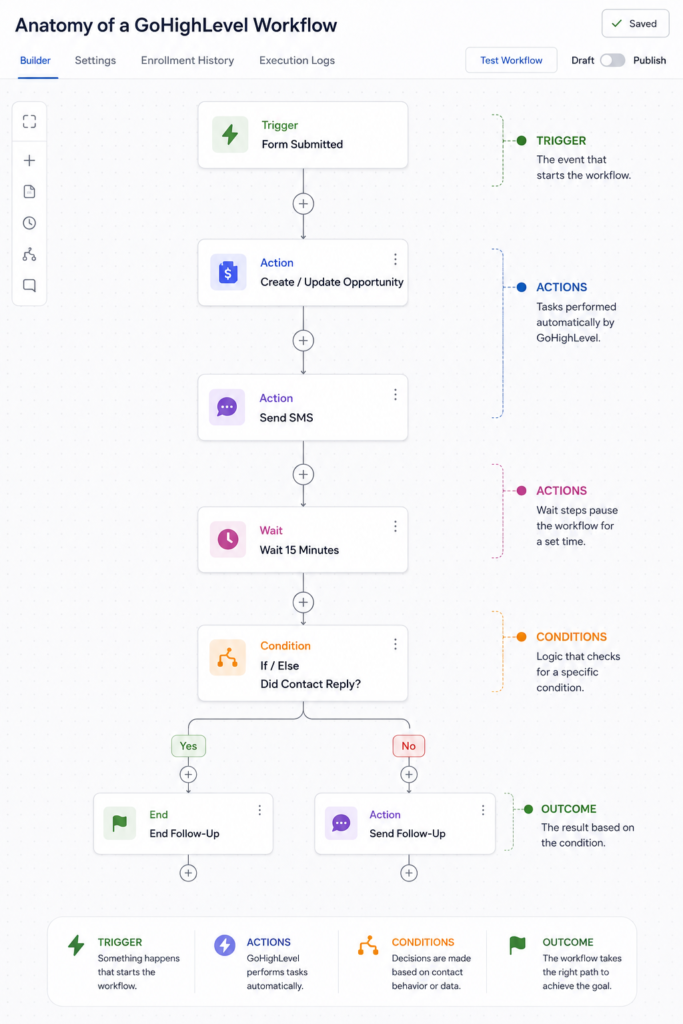
This is the basic logic behind many of the GoHighLevel automations we will cover throughout this guide. Once you understand how triggers, actions, wait steps, and conditions work together, it becomes much easier to build workflows around your own sales and customer processes.
Want to test these workflows yourself?Start your GoHighLevel free trial now and follow the automation examples below.
1. Stop Manually Following Up With Every New Lead
When a new lead submits a form, requests a quote, downloads an offer, or contacts your business, the first response should not depend on someone noticing a notification and replying manually. GoHighLevel automations can start the follow-up process as soon as a new lead enters your CRM.
For example, a GoHighLevel workflow can create an opportunity for the new lead, assign it to the appropriate salesperson, send an SMS or email, and notify your team. If the prospect responds, the automation can stop the follow-up sequence and allow your sales team to continue the conversation.
How a New Lead Follow-Up Workflow Works
A simple workflow could start when someone submits your contact or lead-generation form. GoHighLevel can then create or update their opportunity in the sales pipeline and immediately send the first message.
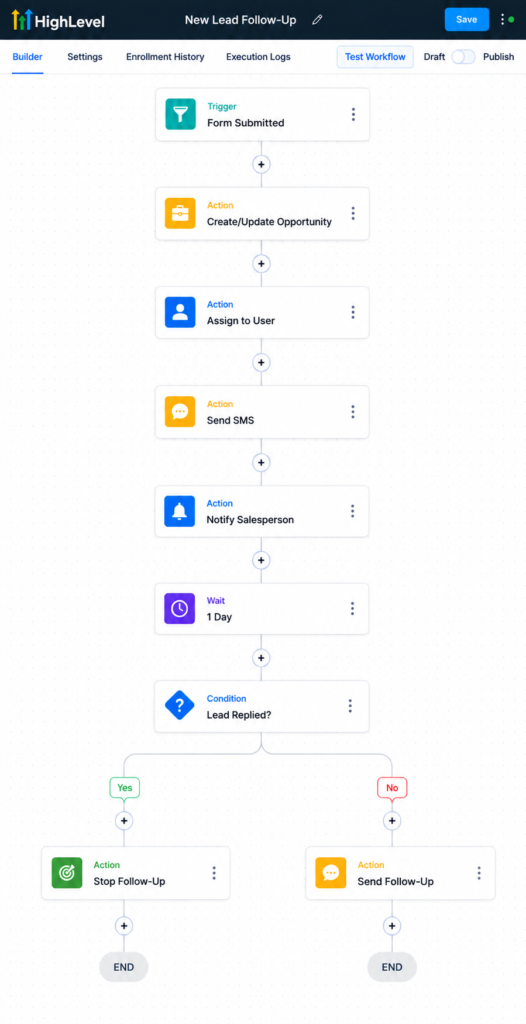
The workflow could look like this:
Trigger: Form Submitted
Action: Create/Update Opportunity
Action: Assign to User
Action: Send SMS
Action: Send Internal Notification
Wait: 1 Day
If/Else: Has the contact replied?
YES: Stop automated follow-up
NO: Send the next follow-up
This is where GoHighLevel automations become more useful than simply scheduling a series of messages. Conditions allow the workflow to respond to what the prospect actually does instead of sending the same sequence to everyone.
Use Wait Steps and If/Else Conditions
Suppose a prospect receives your first SMS and replies within ten minutes. There is little reason to continue sending automated messages asking them to respond.
An If/Else condition can check whether the lead has replied, booked an appointment, or taken another desired action. Leads who engage can follow one path, while leads who have not responded can continue through additional follow-ups.
You can also use wait steps to control the timing between actions. Instead of sending several messages at once, a workflow might send an immediate response, wait until the next day, check the lead’s status, and only continue if another follow-up is still required.
Don’t Automate Every Message
The purpose of lead follow-up automation is not to remove your sales team from the conversation. It is to make sure new leads receive a timely response and that prospects do not disappear simply because someone forgot to follow up.
Once a lead starts a meaningful conversation or requires a personalized response, the salesperson should be able to take over. Your GoHighLevel workflow should be designed with clear conditions and exit points so automation stops when human involvement makes more sense.
This creates a much more practical system: automation handles the repetitive first steps while your sales team focuses on conversations that require actual sales skills.
If your business is still following up with every new inquiry manually, start your GoHighLevel free trial and build your first lead follow-up workflow.
2. Stop Losing Leads From Missed Calls
A missed call can easily become a missed opportunity. If someone calls your business and nobody answers, they may simply contact the next company. With GoHighLevel automations, you can automatically send an SMS after a missed call so the conversation can continue even when your team is unavailable.
GoHighLevel’s Missed Call Text Back can send an immediate message such as, “Sorry we missed your call. How can we help?” The prospect can reply directly, and the conversation can then be managed from GoHighLevel rather than relying on your team to remember to return every missed call.
How a Missed Call Automation Works
The initial text message can be only the beginning. You can connect the missed call with a GoHighLevel workflow that determines what happens next.
A simple setup could be:
Trigger: Inbound Call Status → Missed
Action: Send SMS
Wait: 15–30 Minutes
If/Else: Did the contact reply?
YES: Stop automated follow-up and continue the conversation
NO: Send another follow-up or create a task for your team
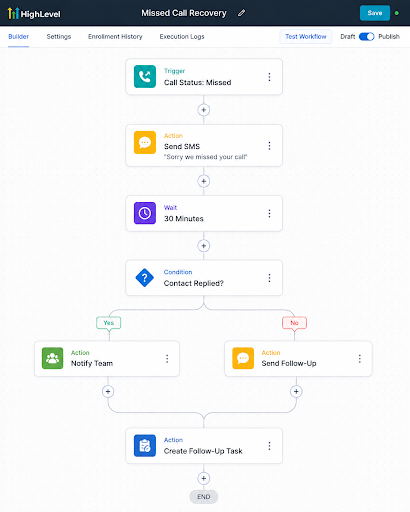
You can also create or update an opportunity, add a tag, assign the contact to a salesperson, or send an internal notification depending on how your business handles inbound calls.
Make the Response Feel Human
Speed matters, but the message should not feel like an automated marketing campaign. Keep the first SMS short and conversational. The goal is simply to acknowledge the missed call and make it easy for the person to continue the conversation.
For businesses that receive a large number of inbound calls, this is one of the simplest GoHighLevel automation examples to implement because it solves a very specific problem: a potential customer called, your team couldn’t answer, and the system immediately creates another opportunity to start the conversation.
Instead of letting missed calls disappear, start your GoHighLevel free trial and automate what happens after your next unanswered call.
3. Stop Manually Qualifying and Assigning Leads
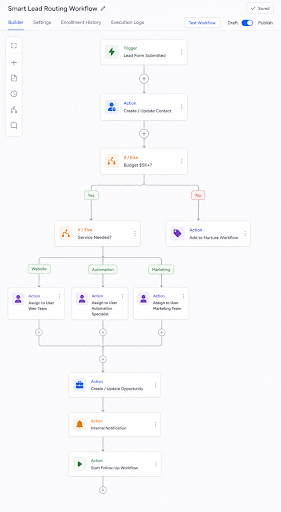
Not every lead should be handled in the same way. A business may have different salespeople for specific services, locations, budgets, or lead types. Instead of reviewing every new inquiry and manually deciding who should handle it, GoHighLevel automations can use the information collected from a lead to determine what should happen next.
For example, your form might collect the prospect’s service requirement, location, budget, and timeline. A GoHighLevel workflow can use that data to qualify the lead, place them in the appropriate pipeline, assign the right team member, and start a relevant follow-up process.
Use If/Else Conditions for Lead Qualification
If/Else conditions allow a workflow to create different paths based on contact or opportunity data. This is particularly useful when your business serves different customer types.
For example:
Trigger: Lead Form Submitted
↓
If/Else: Budget is $5,000+
YES: Create Qualified Opportunity
NO: Add to Nurture Workflow
You can take the same approach with other information. A lead interested in website development could be routed differently from someone interested in marketing automation. Leads from different locations could also be assigned to different sales representatives.
Automatically Route Leads to the Right Person
Once the lead has been qualified, GoHighLevel automations can determine who should receive it.
A more advanced workflow might look like this:
Trigger: New Lead
↓
If/Else: Which service are they interested in?
Website → Assign Web Team
Automation → Assign Automation Specialist
Marketing → Assign Marketing Team
↓
Create/Update Opportunity
↓
Send Internal Notification
↓
Start Relevant Follow-Up Workflow
This means the salesperson receives a more structured lead rather than simply receiving a name and email address with no context.
Use Custom Fields to Improve Routing
Custom fields can make your GoHighLevel CRM automation much more precise. Instead of relying only on tags, you can store structured information such as:
Service: Automation
Budget: $10,000
Location: Texas
Timeline: Within 30 Days
Lead Type: Business Owner
The workflow can then use these values when making routing decisions. For example, a high-value lead with an immediate timeline could be assigned directly to a senior salesperson, while a lower-priority inquiry could enter a longer nurturing sequence.
The important part is to keep your qualification rules practical. You do not need twenty conditions simply because GoHighLevel allows you to create them. Start with the information that actually affects how your team handles a lead.
Automation Should Support Your Sales Rules
Before building complex routing logic, decide how your business actually qualifies and distributes leads. Automation works best when those rules are already clear.
Once they are defined, GoHighLevel workflows can apply those rules consistently every time a new inquiry enters the CRM. Your team spends less time sorting leads manually and more time responding to prospects who have already been routed to the appropriate person.
If lead qualification and assignment are still being handled manually,start your GoHighLevel free trial and build routing rules around your existing sales process.
4. Stop Manually Booking and Reminding People About Appointments
Booking an appointment is only part of the process. Your team may still need to send confirmations, remind prospects before meetings, update the CRM, and follow up when someone cancels or does not show up. GoHighLevel automations can connect these steps so the appointment process continues automatically after someone selects a time.
With a GoHighLevel workflow, an appointment booking can trigger a confirmation message, update the opportunity stage, notify the assigned salesperson, and schedule reminders before the meeting. If the appointment status changes later, another workflow can determine what happens next.
Automate Appointment Confirmations and Reminders
A basic appointment workflow could look like this:
Trigger: Appointment Booked
Action: Send Confirmation SMS
Action: Send Confirmation Email
Action: Update Opportunity → Appointment Scheduled
Action: Notify Assigned User
Wait: Until 24 Hours Before Appointment
Action: Send Reminder
Wait: Until 1 Hour Before Appointment
Action: Send Final SMS Reminder
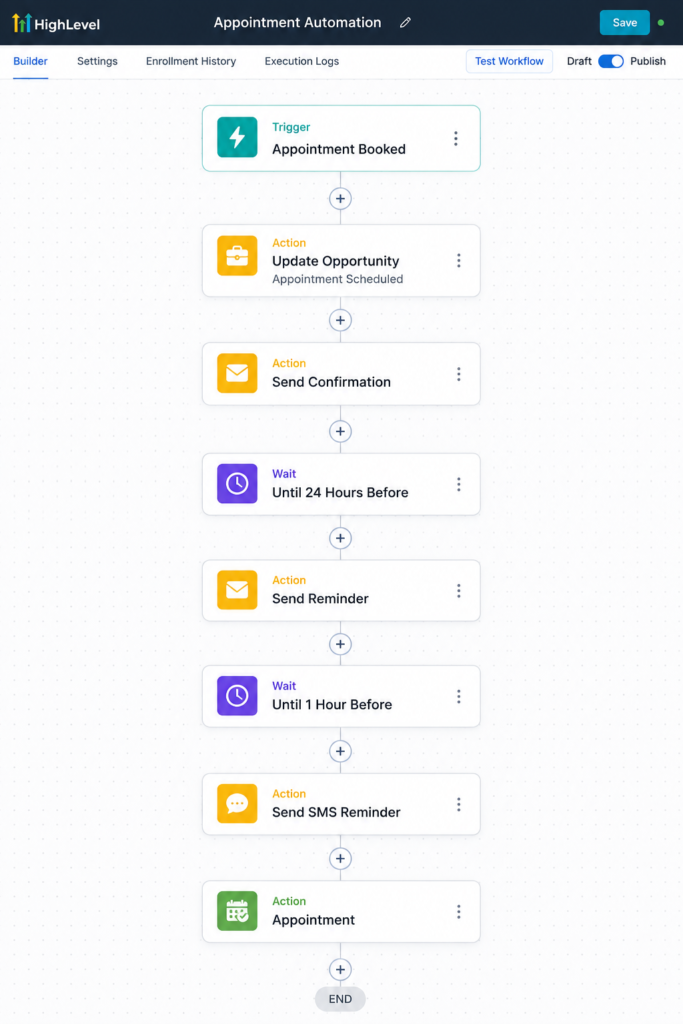
This type of GoHighLevel automation gives every booked prospect a consistent appointment experience without requiring your team to manually send reminders throughout the day.
Change the Workflow Based on Appointment Status
The workflow becomes more useful when it reacts to what happens after the booking.
For example, you can use appointment status and workflow conditions to separate prospects who attended from those who cancelled or did not show.
Appointment Completed → Continue the sales process
Appointment Cancelled → Send rescheduling information
No Show → Start no-show follow-up
This prevents every contact from receiving the same messages regardless of what actually happened.
Keep Your Pipeline Connected to Your Calendar
Your calendar and CRM should not operate as separate systems. If a qualified prospect books a sales call, the opportunity can be moved to an Appointment Scheduled stage automatically.
After the meeting, the next action can depend on your sales process. The opportunity may move forward, enter a follow-up stage, or start another workflow.
This is one of the practical advantages of GoHighLevel CRM automation: an appointment is not simply an event on a calendar. It can become a trigger for the next part of the customer journey.
Avoid Overloading Prospects With Reminders
Automation makes it easy to send messages, but that does not mean you need five reminders before every appointment. Choose reminder timing based on the type of meeting and how far in advance people normally book.
For many businesses, a confirmation followed by a 24-hour and shorter pre-appointment reminder may be enough. The goal of GoHighLevel automations should be to reduce missed appointments without making your communication feel excessive.
By connecting your calendars with workflows, pipeline stages, and follow-up, you can automate much of the administrative work surrounding appointments while keeping your team focused on the actual conversation.
If your team is still manually confirming meetings and sending reminders,start your GoHighLevel free trial and build an automated appointment workflow around your calendar.
5. Stop Manually Updating Your Sales Pipeline
A sales pipeline is only useful when it reflects what is actually happening with your leads. If salespeople have to manually create every opportunity and remember to move each contact from one stage to another, the CRM can quickly become outdated. GoHighLevel automations can automatically create and update opportunities when important events happen during the sales process.
For example, a new qualified lead can automatically enter the New Lead stage. When they schedule a call, the opportunity can move to Appointment Scheduled. If they become a customer, it can move to Won. This allows your pipeline to respond to real customer actions instead of depending entirely on manual updates.
Automate Opportunity Creation
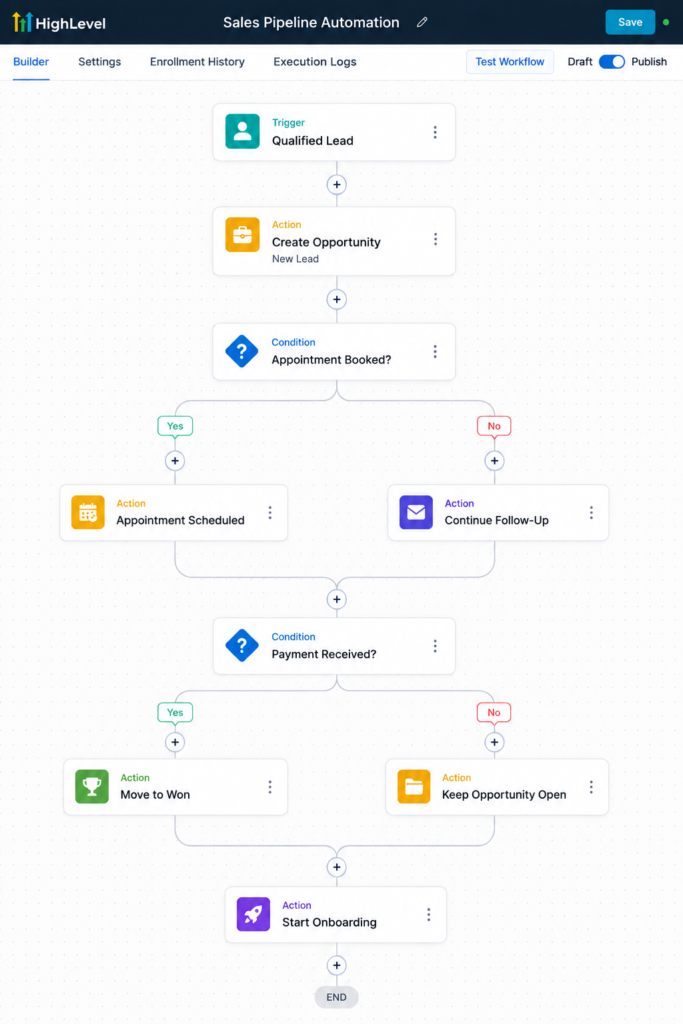
A common GoHighLevel workflow is to create an opportunity as soon as a lead meets your qualification criteria.
For example:
Trigger: Qualified Lead
Action: Create/Update Opportunity
Pipeline: Sales Pipeline
Stage: New Lead
Status: Open
Assigned To: Contact Owner
From there, other GoHighLevel automations can update the same opportunity as the prospect moves forward.
Move Opportunities Based on Customer Actions
The most useful pipeline automations are connected to meaningful events rather than arbitrary time periods.
For example:
Appointment Booked → Appointment Scheduled
Quote/Proposal Sent → Proposal Sent
Payment Received → Won
Deal Lost → Lost
No Response → Follow-Up Required
This can give your sales team a much clearer view of where active opportunities currently stand.
Use Pipeline Changes to Trigger Other Automations
Pipeline stages can also influence what happens next.
Suppose an opportunity moves into Proposal Sent. That change could trigger a follow-up workflow designed specifically for prospects who have already received a proposal.
If an opportunity becomes Won, another workflow could remove the contact from sales follow-ups and start the client onboarding process.
This creates a connected system where GoHighLevel CRM automation is not only updating the pipeline. The pipeline itself can help determine which workflow or communication should happen next.
Don’t Automate Every Pipeline Stage
Not every stage change should happen automatically.
Some stages depend on human judgment. A salesperson may need to determine whether a lead is genuinely qualified, whether negotiations are progressing, or why an opportunity was lost.
Automate stages when there is a clear event that proves the change occurred. Leave stages requiring context or judgment under the control of your sales team.
The goal is not to remove people from pipeline management completely. It is to eliminate unnecessary CRM administration while keeping the data reliable.
When GoHighLevel automations are connected properly with your opportunities, workflows, appointments, and customer actions, your pipeline becomes a more accurate representation of the sales process instead of another system your team has to constantly maintain.
If your team is still manually creating and updating every opportunity, start your GoHighLevel free trial and build your pipeline automation around the actions that already happen in your sales process.
6. Stop Forgetting About Old Leads
Not every lead is ready to buy when they first contact your business. Some prospects need more time, while others stop responding after the initial conversation. Instead of leaving those contacts untouched in your CRM, GoHighLevel automations can help you identify older leads and place them into a structured reactivation campaign.
A GoHighLevel lead reactivation workflow can use SMS and email to restart conversations with prospects who have not engaged for a specific period. The objective is not to repeatedly message your entire database. It is to identify relevant inactive leads, reconnect with them, and move interested prospects back into your active sales process.
Segment Old Leads Before Starting Automation
Before launching a reactivation campaign, decide exactly who should enter it. Depending on your business, you might target contacts who have not replied, booked an appointment, or progressed through the pipeline within the last 60, 90, or 180 days.
At the same time, you should exclude contacts who should not receive the campaign, such as current customers, active opportunities, unsubscribed contacts, or people already communicating with your team.
Good segmentation makes GoHighLevel automations more effective because the workflow is reaching the right group instead of treating every CRM contact the same way.
Build a Simple Lead Reactivation Workflow
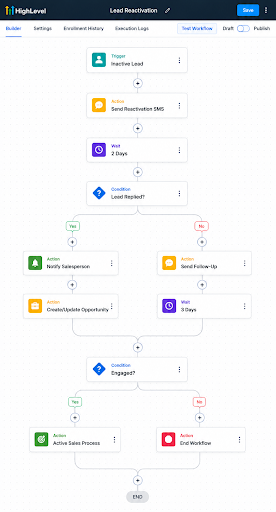
A basic GoHighLevel workflow example could look like this:
Trigger: Contact Added to Reactivation Segment
Action: Send SMS
Wait: 2 Days
If/Else: Did Contact Reply?
YES: Remove From Reactivation Workflow
Action: Notify Salesperson
Action: Create/Update Opportunity
NO: Send Follow-Up Email or SMS
Wait: 3–5 Days
If/Else: Did Contact Engage?
YES: Return to Active Sales Process
NO: End Workflow
This gives interested leads a clear route back into your pipeline while preventing the automation from continuing unnecessarily after someone responds.
Stop the Automation When a Lead Re-Engages
One of the most important parts of a reactivation workflow is its exit logic.
If an old lead replies, schedules an appointment, or starts an active conversation with your team, the automated reactivation messages should stop. Continuing to send messages such as “Are you still interested?” after the person has already booked a meeting creates a poor experience.
This is why GoHighLevel workflow automation should include clear goals and exit conditions rather than simply sending a predetermined sequence to everyone.
Use Reactivation as an Ongoing System
Lead reactivation does not have to be a one-time campaign. Depending on your sales cycle, you can create rules for identifying contacts who become inactive and moving appropriate leads into a longer-term nurture or reactivation process.
For example, a prospect who is interested but not ready to purchase today could remain in a nurture workflow. If they later click a link, reply to a message, submit another form, or book an appointment, GoHighLevel automations can move them back into the appropriate active process.
This allows your existing database to remain useful instead of constantly relying on new lead generation. In many businesses, there may already be opportunities inside the CRM that simply need the right follow-up at the right time.
If you have hundreds of old leads sitting untouched in your database,start your GoHighLevel free trial and build a reactivation workflow to bring qualified opportunities back into your sales process.
7. Stop Manually Asking Customers for Reviews
Customer reviews can influence how potential customers evaluate a business, but asking for them manually is easy to forget. With GoHighLevel automations, you can build review request workflows that automatically contact customers after a service, appointment, purchase, or other completed milestone.
Instead of your team remembering to send every request individually, a GoHighLevel workflow can trigger at the appropriate point in the customer journey. The customer receives a review request while their experience with your business is still fresh, and your team does not have to manage the process manually.
Trigger Review Requests at the Right Time
The most important part of review automation is choosing the correct trigger. A review request should be connected to an event that confirms the customer has actually completed their experience with your business.
Depending on your setup, that could be:
Opportunity Status → Won
Pipeline Stage → Service Completed
Appointment Status → Completed
Tag Added → Customer Completed
Once the trigger occurs, GoHighLevel automations can wait for an appropriate amount of time before sending the review request.
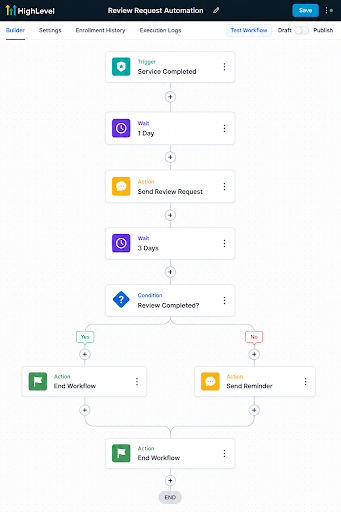
Build a Simple Review Request Workflow
A basic workflow might look like this:
Trigger: Service Completed
↓
Wait: 1 Day
↓
Action: Send Review Request
↓
Wait: 3 Days
↓
If/Else: Review Request Completed?
YES: End Workflow
NO: Send One Follow-Up
↓
End Workflow
The exact timing should depend on your business. A restaurant, home-service company, agency, consultant, or other service provider may each have a different ideal time for requesting feedback.
Personalize the Review Request
Automated does not have to mean impersonal. You can use contact information and custom values inside GoHighLevel workflows to make the message feel more relevant.
For example, instead of sending a generic message asking for a review, you could reference the customer’s name and thank them for choosing your business before providing the review link.
Keep the request simple. Customers should immediately understand what you are asking them to do and where they need to go.
Avoid Sending Review Requests at the Wrong Time
Your workflow should also consider situations where sending an automated review request would not make sense.
For example, if a customer has an unresolved support issue, cancelled service, or another problem requiring attention, your team may want to resolve that situation before continuing with normal post-service communication.
This is another reason GoHighLevel automation examples should include conditions rather than relying only on triggers and scheduled messages. The best automation considers what is happening with the customer before deciding what to send next.
When review requests become part of your normal customer workflow, collecting feedback becomes a repeatable process rather than something your team remembers occasionally.
If review requests are still being sent manually,start your GoHighLevel free trial and build an automated reputation management process around your customer journey.
8. Stop Manually Chasing No-Shows
Even with appointment reminders, some prospects will still miss scheduled calls or meetings. Instead of requiring your sales team to manually check the calendar, send another message, and chase the prospect for a new time, GoHighLevel automations can start a recovery workflow as soon as an appointment is marked as a no-show.
The goal is simple: make it easy for the prospect to reschedule while the opportunity is still active. If they respond or book another appointment, the GoHighLevel workflow can stop automatically. If they do not, the system can follow up again or create a task for your sales team.
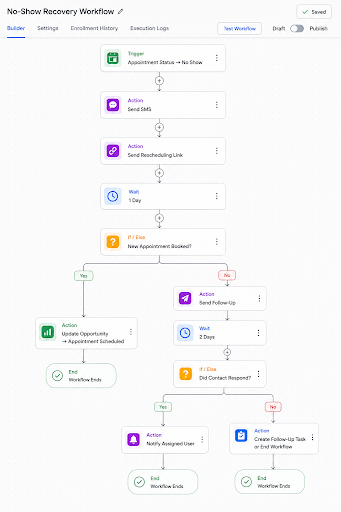
Build a No-Show Recovery Workflow
A practical GoHighLevel workflow example could look like this:
Trigger: Appointment Status → No Show
↓
Action: Send SMS
↓
Action: Send Rescheduling Link
↓
Wait: 1 Day
↓
If/Else: New Appointment Booked?
YES: Update Opportunity → Appointment Scheduled
NO: Send Follow-Up
↓
Wait: 2 Days
↓
If/Else: Did Contact Respond?
YES: Notify Assigned User
NO: Create Follow-Up Task or End Workflow
This gives the prospect another opportunity to schedule without requiring your team to manually follow up after every missed meeting.
Connect No-Shows With Your Sales Pipeline
A no-show can also affect the opportunity inside your CRM. Instead of leaving the prospect in Appointment Scheduled, your GoHighLevel automation can move the opportunity into a stage such as No Show or Reschedule Required.
If the prospect books another appointment, the opportunity can move back to the appropriate stage. This keeps your pipeline more accurate and helps your sales team distinguish between upcoming appointments and prospects who need attention.
Keep the Rescheduling Process Simple
A no-show message does not need to be complicated. The prospect already knows they missed the appointment, so the most useful next step is usually to provide an easy way to reschedule.
Your first message could simply acknowledge the missed appointment and include the relevant calendar link. If they do not take action, one additional follow-up may be enough before the lead returns to another nurture process or requires manual attention.
This is where GoHighLevel automations can save time without removing the human element. The system handles the predictable administrative steps, while your team can focus on prospects who reply or require a more personal conversation.
If your sales team is still manually chasing every missed appointment,start your GoHighLevel free trial and create a no-show recovery workflow that automatically brings prospects back into your booking process.
9. Stop Answering Every Repetitive Lead Question Yourself
Many new leads ask the same questions before they are ready to speak with someone: What does the service cost? How does it work? Are appointments available? Do you serve my location? What information do you need from me? With GoHighLevel, AI can help handle these repetitive early conversations while your team focuses on leads that need a personal response.
GoHighLevel AI automations can be used to answer common questions, collect lead information, qualify prospects, and guide them toward the appropriate next step. Depending on your setup, this could mean booking an appointment, updating contact information, or handing the conversation over to a team member.
Use Conversation AI for Lead Qualification
Instead of using AI only as a basic chatbot, you can give it a specific purpose within your sales process.
For example, a new prospect could start a conversation and the AI could collect information such as their required service, budget, location, timeline, and other qualification details.
Once enough information has been collected, your GoHighLevel automation can use that data to determine what happens next.
A qualified prospect might be directed toward your calendar, while another lead could enter a nurture workflow. If the conversation requires information that the AI should not provide, it can be handed over to a person.
Connect AI With Your GoHighLevel Workflows
AI becomes more useful when it works alongside your CRM rather than operating as an isolated chatbot.
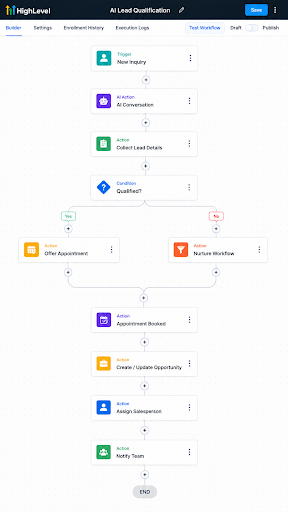
A practical setup could be:
New Inquiry
↓
AI Starts Conversation
↓
Collect Qualification Details
↓
If/Else: Qualified Lead?
YES: Offer Appointment
NO: Continue Nurture
↓
Appointment Booked
↓
Create/Update Opportunity
↓
Assign Salesperson
↓
Notify Team
This allows GoHighLevel workflows to handle what happens around the AI conversation while the CRM keeps the lead information organized.
Use Voice AI for Incoming Calls
Businesses that receive a high volume of calls can also explore GoHighLevel’s voice AI capabilities. An AI voice agent can help handle initial inquiries, answer approved questions, collect information, and move callers toward the appropriate next step.
For example, an incoming caller might be asked what service they need and when they would like to get started. The information collected can help qualify the inquiry before it reaches your sales team.
This can be particularly useful for after-hours inquiries or periods when your team cannot answer every incoming call.
Know When AI Should Hand the Conversation Over
Not every conversation should be automated. Pricing negotiations, complaints, unusual requirements, complex questions, and high-value sales conversations may require human judgment.
Your AI setup should therefore have clear boundaries. Define what information it can provide, what questions it should ask, and when the conversation should be transferred or escalated.
The strongest GoHighLevel AI automations do not try to replace your team. They handle predictable conversations and repetitive qualification steps so your team can spend more time on leads that require expertise and personal attention.
If repetitive lead conversations are taking up too much of your team’s time,start your GoHighLevel free trial and explore how AI and workflows can work together within your sales process.
10. Stop Manually Onboarding Every New Client
Closing a deal creates a completely new set of tasks. Someone needs to send the welcome email, collect client information, notify the team, update the CRM, schedule the kickoff meeting, and make sure the client knows what happens next. With GoHighLevel automations, much of this onboarding process can begin automatically as soon as a customer reaches the right stage.
Instead of relying on a salesperson or account manager to remember every onboarding step, a GoHighLevel workflow can create a consistent process for every new customer. Your team can still handle the parts that require personal interaction while the system takes care of repetitive administrative tasks.
Start the Workflow After a Sale
Your onboarding automation needs a clear starting point. Depending on how your business operates, this could be a successful payment, signed agreement, opportunity status, or specific pipeline stage.
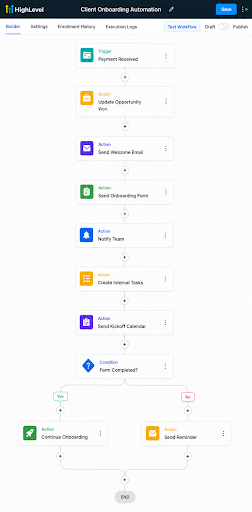
For example:
Trigger: Payment Received
↓
Action: Update Opportunity → Won
↓
Action: Send Welcome Email
↓
Action: Send Onboarding Form
↓
Action: Notify Team
↓
Action: Create Internal Tasks
↓
Action: Send Kickoff Calendar Link
This type of GoHighLevel automation creates an immediate transition between becoming a customer and starting the onboarding process.
Automate Information Collection
Most businesses need information from a client before work can begin. Instead of collecting those details through scattered emails and messages, you can send an onboarding form automatically.
The form might collect business information, service requirements, contact details, account information, goals, or other details your team needs.
Once the form is submitted, another part of the GoHighLevel workflow can continue automatically.
For example:
If/Else: Onboarding Form Submitted?
YES: Continue Onboarding
NO: Wait 2 Days → Send Reminder
This keeps the process moving without requiring someone to manually check whether every new client has completed their onboarding information.
Create Internal Tasks and Notifications
Client onboarding is not only about communication with the customer. Your internal team also needs to know what happens next.
GoHighLevel workflows can send internal notifications or create tasks when specific onboarding milestones are reached.
For example, when a client submits their onboarding form, the appropriate team member could receive a notification to review the information. Another task could remind someone to prepare the account before the kickoff meeting.
This creates a clearer handoff between sales and fulfillment.
Connect Onboarding With Your CRM
Once a prospect becomes a customer, they should not continue moving through the same sales automation.
Your GoHighLevel automations can remove the contact from relevant sales workflows, update the opportunity status, apply the appropriate customer information, and begin the onboarding journey.
A simple transition could be:
Lead → Qualified → Appointment → Sale → Client Onboarding
This keeps your CRM aligned with the actual customer relationship and reduces the chance of new clients receiving outdated sales messages after purchasing.
Keep Human Interaction Where It Matters
Automating onboarding does not mean removing personal communication. Welcome calls, strategy discussions, implementation planning, and relationship management may still require direct involvement from your team.
The purpose of GoHighLevel workflow automation is to automate the predictable steps around those interactions.
The system can collect information, send reminders, create tasks, update records, and notify the right people. Your team can then spend its time understanding the client’s requirements and delivering the service.
A well-designed onboarding workflow gives every new client a more consistent starting experience while reducing repetitive administrative work for your team.
If you want to build an automated onboarding process for your own business,start your GoHighLevel free trial and create workflows around the steps your team currently handles manually.
How Multiple GoHighLevel Automations Work Together
The real value of GoHighLevel automations comes from connecting different workflows across the customer journey. A lead may first enter through a form, receive an automated response, get qualified, book an appointment, move through your sales pipeline, become a customer, complete onboarding, and later receive a review request.
Each of these steps can use a different GoHighLevel workflow, but they should share information through the same CRM. This allows one action to determine what happens next without forcing your team to manually move information between different systems.
Build Around the Customer Journey
A connected automation system should follow the customer journey from beginning to end. A new lead can enter your CRM, go through lead qualification, receive automated follow-ups, and book an appointment. From there, GoHighLevel automations can move the opportunity through the sales pipeline until payment is received. Once the lead becomes a customer, the system can start client onboarding, manage post-sale communication, and trigger a review request after the service is completed. The customer can then enter a long-term nurture workflow to maintain the relationship and create future opportunities for repeat business or referrals.
Use One Workflow to Start or Stop Another
More advanced GoHighLevel automations can use workflow actions, tags, opportunity stages, appointments, contact information, and other CRM events to control which processes a contact should enter or leave.
For example:
Appointment Booked
→ Stop Lead Follow-Up
→ Start Appointment Reminders
Payment Received
→ Stop Sales Follow-Up
→ Update Opportunity to Won
→ Start Client Onboarding
Service Completed
→ Start Review Request
This creates a cleaner customer journey because automation changes as the relationship with the contact changes.
Keep Your Automation System Simple
Connecting workflows does not mean you need hundreds of automations.
A smaller number of well-structured GoHighLevel workflows with clear triggers, conditions, goals, and exit rules is usually easier to manage than dozens of overlapping workflows.
Before creating another automation, ask what event should start it, what outcome it needs to achieve, and what should make it stop.
When those rules are clear, GoHighLevel automations can connect different parts of your sales and customer process while keeping the CRM organized.
If you want to start building connected workflows for your business,start your GoHighLevel free trial and begin with the repetitive processes that currently require the most manual work.
Common GoHighLevel Automation Mistakes to Avoid
Building more workflows does not necessarily mean you have a better automation system. Poorly planned GoHighLevel automations can create duplicate messages, incorrect pipeline updates, unnecessary follow-ups, and confusion for both customers and your team. Before publishing a workflow, make sure its trigger, actions, conditions, and intended outcome are clearly defined.
One of the most common mistakes is forgetting to create an exit condition. If a workflow is designed to get a lead to book an appointment, the automated booking follow-ups should stop once that appointment is scheduled. The same applies when a lead replies, makes a payment, becomes a customer, or reaches another important milestone. Without these rules, a contact may continue receiving messages that are no longer relevant.
Avoid Overlapping Workflows
Multiple GoHighLevel workflows can sometimes act on the same contact at the same time. For example, a lead might enter a new-lead workflow, a nurture campaign, and an appointment workflow simultaneously. If these automations are not coordinated, the person could receive several messages within a short period.
Use clear enrollment rules, filters, workflow removal actions, and CRM data to control which automation a contact should be in at each stage of the customer journey.
Don’t Overuse Tags
Tags are useful for segmentation and workflow triggers, but using too many can make your CRM difficult to manage. Whenever possible, use structured information such as custom fields, opportunity stages, appointment statuses, and other relevant CRM data for information that needs a clear value.
A tag such as Hot Lead may be useful for segmentation, but important information like budget, service type, location, or sales stage is often better stored in the appropriate CRM field.
Test Every Branch Before Publishing
Never assume a workflow will behave exactly as expected. Test your GoHighLevel automations using different scenarios, especially when they include multiple If/Else branches, wait steps, appointment conditions, opportunity updates, or other workflows.
Check what happens when a lead replies, does not reply, books an appointment, cancels, makes a payment, or fails to meet a condition. Testing these different paths can help you identify problems before real prospects enter the workflow.
Keep Your Workflows Organized
As your automation system grows, use clear names for workflows and keep their purpose specific. A name such as New Lead – Website – Follow-Up is much easier for your team to understand than something generic like Workflow 12.
Well-organized GoHighLevel automations are easier to troubleshoot, update, and hand over to another team member. The objective is not to build the most complicated automation possible. It is to create workflows that your business can understand, maintain, and improve over time.
If you want to experiment with these workflows yourself,start your GoHighLevel free trial and begin with one clearly defined process before building more advanced automations.
How to Decide What You Should Automate First
The best GoHighLevel automations usually start with tasks your team performs repeatedly. Look at your daily sales and customer processes and identify where people spend time sending the same messages, updating the same information, assigning leads, checking appointments, or reminding customers about the same next steps.
Start with processes that are repetitive, predictable, time-sensitive, and rule-based. New lead follow-up is a good example because the process is usually clear: a lead enters the CRM, receives a response, gets assigned to someone, and moves toward an appointment. Appointment reminders, missed-call responses, pipeline updates, review requests, and onboarding are other processes where GoHighLevel workflow automation can remove unnecessary manual work.
Keep Human Decisions Human
Not every task should become a GoHighLevel automation. Sales negotiations, complex support issues, strategic conversations, complaints, and situations requiring judgment are usually better handled by a person.
A useful rule is to automate the predictable steps around human interactions rather than trying to automate the entire relationship. GoHighLevel can collect information, send reminders, update records, create tasks, and notify your team, while your people handle conversations where experience and judgment matter.
Start With High-Impact Automations
If you are new to GoHighLevel workflows, prioritize automations that directly affect response time, lost opportunities, or repetitive administrative work. For many businesses, that means starting with new lead follow-up, appointment reminders, missed-call text back, lead routing, and pipeline updates before moving into more advanced AI or multi-workflow systems.
Once those basic GoHighLevel automations are working correctly, you can gradually connect lead nurturing, reactivation, reviews, AI conversations, and client onboarding. Building in stages makes the system easier to test, understand, and improve.
The goal is not to automate the largest number of tasks. It is to identify the manual processes that consume time or create unnecessary gaps and build reliable systems around them.
If you are ready to start replacing repetitive work with automation,start your GoHighLevel free trial and begin with one process your team currently handles every day.
GoHighLevel Automation Implementation Roadmap
Building effective GoHighLevel automations starts with understanding your existing process before opening the workflow builder. Identify a repetitive task, map what currently happens from beginning to end, and decide which actions require automation and which still need human involvement.
Once the process is clear, define the trigger that starts the workflow and the outcome you want it to achieve. You can then add the necessary actions, wait steps, If/Else conditions, assignments, notifications, and exit rules. Keep the first version simple rather than trying to account for every possible scenario immediately.
Test Before You Launch
Testing is an important part of building GoHighLevel workflows. Run test contacts through each possible path and confirm that messages are sent correctly, opportunities are updated, users are assigned properly, and contacts leave the workflow when the intended outcome occurs.
After testing, launch the automation with a smaller group before applying it across your entire database. Monitor how contacts move through the workflow and look for unnecessary messages, delays, incorrect conditions, or steps where human intervention may work better.
Improve Your GoHighLevel Automations Over Time
Your first workflow does not need to be your final workflow. As your sales process changes and you collect more data, review your GoHighLevel automations and improve the logic where necessary.
A simple implementation process is:
Identify → Map → Build → Add Logic → Test → Launch → Monitor → Improve
This approach helps you build automation around real business processes instead of creating complicated workflows that are difficult to maintain.
The most effective GoHighLevel workflow automation is usually built gradually. Start with one high-impact process, make sure it works correctly, and then connect it with other parts of your CRM as your automation system develops.
If you want to start building your own workflows,start your GoHighLevel free trial and use this roadmap to automate your first repetitive business process.
Are GoHighLevel Automations Worth It?
GoHighLevel automations can be valuable for businesses that regularly generate leads, schedule appointments, manage sales opportunities, communicate with customers, or handle repetitive administrative tasks. Instead of using separate tools for every step, GoHighLevel allows many of these processes to work together through the CRM and workflow builder.
The biggest advantage is not simply saving time. Well-designed GoHighLevel workflows can create a more consistent process. New leads can receive faster responses, appointments can be followed up automatically, opportunities can stay organized, and customers can move from sales to onboarding without your team manually managing every step.
GoHighLevel Automation Works Best With a Clear Process
Automation cannot fix a process that has not been properly defined. Before building complex GoHighLevel automations, you should understand how a lead or customer is supposed to move through your business.
Once that process is clear, GoHighLevel can automate many of the predictable steps around it. Your team can still handle sales conversations, strategic decisions, customer relationships, and situations that require human judgment.
For smaller businesses, even a few workflows such as new lead follow-up, missed call text back, appointment reminders, pipeline automation, and review requests can remove a significant amount of repetitive work. Larger teams can go further by connecting lead routing, AI conversations, onboarding, reactivation, and multiple pipelines.
Ultimately, the value of GoHighLevel workflow automation depends on what you automate and how well the workflows are designed. Ten reliable automations that solve real operational problems are more useful than hundreds of complicated workflows that your team cannot understand or maintain.
If you want to explore what you can automate in your own business,start your GoHighLevel free trial and begin with one repetitive process that currently takes up your team’s time.
Frequently Asked Questions About GoHighLevel Automations
What Can You Automate With GoHighLevel?
GoHighLevel can automate many repetitive sales, marketing, and customer management tasks. Common GoHighLevel automations include lead follow-ups, SMS and email sequences, lead assignment, appointment reminders, missed-call text back, pipeline updates, old lead reactivation, review requests, AI conversations, and client onboarding.
How Do GoHighLevel Workflows Work?
GoHighLevel workflows use triggers and actions to automate a process. A trigger starts the workflow when a specific event occurs, such as a form submission or appointment booking. The workflow can then send messages, update opportunities, assign users, wait for a specific period, check If/Else conditions, and perform other actions based on what the contact does.
Can GoHighLevel Automatically Follow Up With Leads?
Yes. GoHighLevel automations can send SMS and email follow-ups when a new lead enters your CRM. You can add wait steps and conditions so the sequence changes or stops when the prospect replies, books an appointment, or reaches another defined goal.
Can GoHighLevel Automate SMS and Email?
Yes. GoHighLevel workflows can automatically send SMS and email messages based on triggers and conditions. This can be used for new lead responses, nurture campaigns, appointment reminders, no-show follow-ups, review requests, reactivation campaigns, and onboarding.
Can GoHighLevel Automatically Assign Leads?
Yes. Leads can be assigned based on rules you create inside your workflows. For example, GoHighLevel workflow automation can route prospects according to service, location, budget, lead type, or other information stored in the CRM.
Can GoHighLevel Automate Appointment Reminders?
Yes. A workflow can start when an appointment is booked and send confirmations and reminders at specific times before the meeting. You can also build separate GoHighLevel automations for cancellations, rescheduling, and no-shows.
Can GoHighLevel Automatically Update Pipeline Stages?
Yes. GoHighLevel can create and update opportunities based on events such as form submissions, appointments, payments, or other workflow conditions. However, stages that depend on sales judgment may still be better updated manually.
Can GoHighLevel Reactivate Old Leads?
Yes. Older leads can be segmented and added to reactivation workflows using SMS, email, and other follow-up methods. If a prospect responds or books an appointment, the GoHighLevel workflow can remove them from the reactivation sequence and return them to the active sales process.
Can GoHighLevel Use AI to Respond to Leads?
Yes. GoHighLevel offers AI capabilities that can support conversations, answer approved questions, collect information, qualify prospects, and help move leads toward appointments or other next steps. AI works best when it has clear instructions, defined boundaries, and rules for when a conversation should be handed over to a person.
Can GoHighLevel Automate Client Onboarding?
Yes. GoHighLevel automations can start after a payment, signed agreement, or opportunity-stage change. A workflow can send welcome emails and onboarding forms, notify team members, create tasks, update CRM records, and provide a calendar link for the kickoff meeting.
Are GoHighLevel Workflows Difficult to Build?
Basic workflows are relatively straightforward once you understand triggers, actions, wait steps, and If/Else conditions. More advanced GoHighLevel workflows can become complex when multiple pipelines, integrations, AI tools, routing conditions, or workflows need to work together. Planning and testing the process before publishing it becomes increasingly important as the automation grows.
If you want to explore these features yourself,start your GoHighLevel free trial and begin with one of the simpler automations covered in this guide.
About Muhammad Nouman – Certified Gohighlevel Expert
I’m Muhammad Nouman, a Certified GoHighLevel Expert and business strategist. I help businesses build CRM, automation, lead generation, and AI-powered systems that reduce repetitive work and create a more organized sales and customer journey.
I’ve worked extensively withGoHighLevel, building everything from CRM structures and sales pipelines to lead nurturing, advanced workflows, appointment systems, integrations, and AI automations. My approach is simple: understand how the business actually operates first, then build GoHighLevel automations around the processes that make sense to automate.
Ready to Automate Your Business With GoHighLevel?
If you want to build these workflows yourself, you can start your GoHighLevel free trial and use the automation examples in this guide as a starting point.
If you would rather have your CRM and workflows planned around your specific business, you can book a 15-minute strategy call with me. We can look at your current sales process, identify the repetitive tasks worth automating, and determine how GoHighLevel can fit into your existing system.
The goal is not to automate everything. It is to build a system where GoHighLevel automations handle predictable, repetitive work while you and your team focus on sales, customers, strategy, and the conversations that actually require human involvement.
Affiliate Disclosure
This article contains affiliate links to GoHighLevel. If you sign up through one of these links, I may earn a commission at no additional cost to you. I recommend GoHighLevel based on my experience working with the platform as a Certified GoHighLevel Expert. Using my affiliate link does not increase the price you pay.
Read more articles on our website Iloveghl.










Be First to Comment