Building an automation workflow is relatively straightforward. Keeping that automation running reliably, maintaining control over your data, and managing the cost as your business grows can be much more challenging.
Consider a business that relies on automation to capture leads from its website, send information to a CRM, notify its sales team, and initiate customer follow-ups. If those processes depend entirely on third-party automation subscriptions, the company must account for usage limits, recurring fees, and the capabilities offered by each subscription plan. For some businesses, running their own automation infrastructure becomes an attractive alternative.
This is where Hostinger n8n VPS hosting comes into the picture.
n8n is a workflow automation platform that allows users to connect applications, exchange information between systems, and automate repetitive processes through a visual interface. By installing n8n on a virtual private server (VPS), you can operate your own automation environment rather than relying entirely on a managed cloud service.
One reason to consider Hostinger for self-hosted n8n is its preconfigured installation template. Instead of setting up Ubuntu, Docker, and n8n entirely from scratch, you can select a VPS template that already includes the necessary application environment. This makes deployment more approachable, particularly for people who want to focus on building automations rather than configuring infrastructure.
In this guide, I’ll explain how to host n8n on Hostinger VPS in 2026, compare available VPS plans, walk through installation, and demonstrate how to create your first automation. I’ll also cover the responsibilities often overlooked in beginner tutorials, helping you make an informed decision before purchasing.
TL;DR: Hostinger n8n VPS Setup
- What you’re building: A self-hosted n8n automation server that connects applications, processes data, runs scheduled tasks, and receives webhook events.
- Easiest setup: Use Hostinger’s n8n VPS hosting, which offers an Ubuntu 24.04 template with n8n preinstalled through Docker.
- Hosting prices: As reviewed on November 18, 2026, introductory prices start at $6.49/month for KVM 1 and $8.79/month for KVM 2 on eligible 24-month subscriptions, billed upfront.
- Recommended plan: KVM 1 is suitable for learning and light workloads. KVM 2 offers more CPU and memory for users planning more demanding automations.
- Installation process: Purchase a VPS, select the n8n template, complete provisioning, create an owner account, and test your first workflow.
- Important considerations: Self-hosting provides infrastructure control but requires ongoing maintenance, backups, updates, monitoring, and security.
- Get started: Explore Hostinger VPS plans and available offers.
What Is n8n, and Why Should You Consider Self-Hosting It?
n8n is a workflow automation platform designed to connect applications and perform tasks automatically. Its visual workflow editor allows users to build processes by connecting nodes, with each node performing a function such as receiving data, checking conditions, transforming information, interacting with an API, or triggering another action.
For example, a marketing agency might receive an inquiry through its website. Normally, someone would need to review the submission, enter the details into a CRM, assign the lead to a team member, and send an acknowledgment. With a properly configured n8n workflow, these steps can happen automatically. The workflow can receive the submission, validate the contact details, create or update a CRM record, notify the appropriate salesperson, and record the activity.
The real value isn’t simply connecting applications. It’s the ability to design repeatable processes around operational requirements. Workflows can incorporate conditional logic, data transformations, error handling, external APIs, and AI services where appropriate.
What does self-hosting actually mean?
Self-hosting means installing and operating an application on infrastructure you manage. Instead of accessing an automation platform exclusively through the provider’s cloud subscription, you deploy the software on your own server.
With Hostinger n8n VPS, you rent a virtual server, install n8n using an application template, and manage the resulting environment through the hosting dashboard and n8n editor.
This provides greater infrastructure control. You can configure supporting applications, manage server resources, establish your own domain, and work with the underlying operating system. The trade-off is that updates, data protection, server configuration, and technical troubleshooting become your responsibility.
Self-hosting also doesn’t make every component of your automation free. You’ll still pay for VPS hosting, and connected services may have their own charges. For example, a workflow using a paid AI API will generally incur API charges even though n8n runs on your VPS.
n8n Cloud vs self-hosted n8n
The decision between n8n Cloud and self-hosting depends largely on whether you’re prepared to maintain infrastructure yourself.
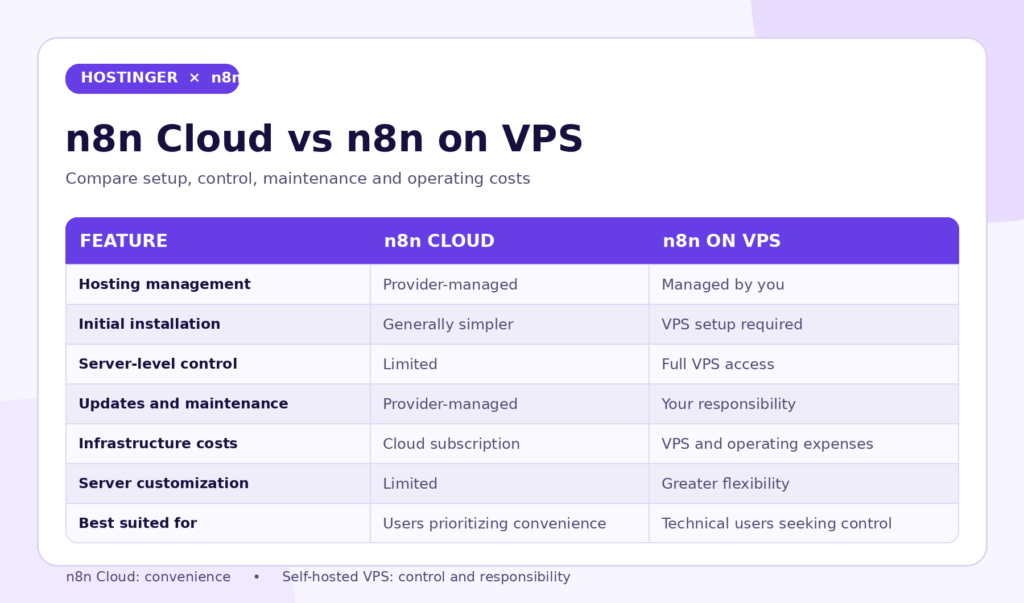
A managed cloud subscription can be appropriate if you prefer building workflows rather than administering servers. Self-hosting becomes more appealing when you have the technical capacity to maintain a deployment and want greater control over its environment.
It’s also important to understand that n8n’s self-hosted Community Edition follows a source-available licensing model. Certain commercial features and business models may require additional licensing regardless of where the application is hosted.
Why Choose Hostinger VPS for n8n Automation?
Not every hosting plan can run an application such as n8n. Traditional shared hosting is generally designed for conventional websites and may not provide the operating system access or persistent application processes that n8n requires.
A VPS provides a more suitable environment because it allocates computing resources and offers greater control over the operating system. With Hostinger n8n VPS hosting, you can run n8n as a Docker-based application on an Ubuntu server.
One major advantage is the preconfigured n8n template. It reduces manual installation work, making it possible to deploy the application without building the entire Docker environment yourself.
Another advantage is root access. This allows you to manage the server, inspect logs, configure supporting services, and adjust the hosting environment. For developers and automation professionals, this flexibility can be valuable when building integrations involving APIs, databases, and custom processing.
Hostinger’s VPS hosting plans also provide specified CPU, RAM, storage, and bandwidth allocations. These resources help you evaluate the infrastructure you’re purchasing rather than selecting a plan solely based on price.
For example, a simple automation running once per day and transferring a few records may require relatively few resources. A workflow processing thousands of records, handling simultaneous webhook requests, or performing complex calculations can place greater demands on the server.
Having more computing resources doesn’t guarantee successful execution, but it provides additional capacity for workloads that need it.
Hostinger also offers templates for advanced deployment patterns, including n8n queue mode. This can be useful when an automation environment becomes more complex, although it introduces additional infrastructure requirements.
Hostinger n8n VPS Pricing in 2026: Which Plan Should You Choose?
Choosing the right VPS is an important decision. An underpowered server may become slow or unreliable when workflows execute simultaneously, while an unnecessarily expensive server increases costs without delivering meaningful benefits.
Hostinger’s VPS plans for n8n include four KVM tiers, ranging from entry-level resources to configurations intended for more demanding applications.
The following promotional prices were reviewed on November 18, 2026.
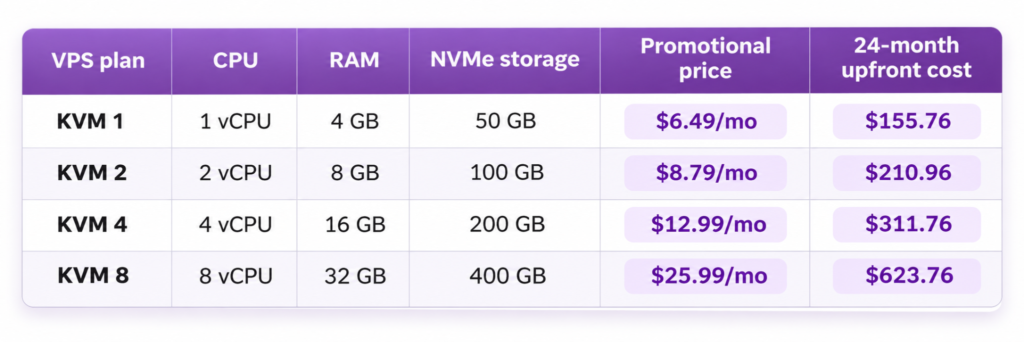
These are advertised promotional prices for eligible 24-month subscriptions, not permanent month-to-month rates. The full subscription term is paid upfront. Renewal prices are higher, and taxes or optional services may increase the final amount.
KVM 1: Best for learning n8n and lightweight automations
KVM 1 provides one virtual CPU core, 4 GB of RAM, and 50 GB of NVMe storage. For someone new to self-hosting, these resources can provide a starting point for learning n8n, exploring integrations, and creating lightweight workflows.
You might use this configuration to automate daily reports, transfer small datasets, send internal notifications, or experiment with webhook-based integrations.
The limitations become more noticeable when workflows handle large datasets or several executions happen simultaneously. Memory-intensive processing, inefficient workflow design, and additional applications running on the server can affect performance.
If you’re learning n8n or experimenting with an initial automation project, Hostinger KVM 1 is a reasonable plan to evaluate.
KVM 2: A practical choice for growing automation requirements
KVM 2 provides two virtual CPU cores, 8 GB of RAM, and 100 GB of NVMe storage. Compared with KVM 1, it offers additional processing capacity and memory for managing multiple workflows.
For a small business automating inquiries, appointments, internal reporting, and CRM updates, I would evaluate KVM 2 before making a purchasing decision.
At the advertised introductory rates, KVM 2 costs $55.20 more than KVM 1 over the initial 24-month term. That difference may be reasonable if you already expect to operate several important business automations.
However, actual usage determines the appropriate plan. A poorly designed workflow can exhaust resources even on a powerful server, while an optimized workflow may run comfortably on a smaller configuration.
You can compare Hostinger KVM 1 and KVM 2 hosting plans to evaluate the available resources and current pricing.
KVM 4 and KVM 8: For resource-intensive deployments
KVM 4 includes four virtual CPU cores and 16 GB of RAM, while KVM 8 provides eight virtual CPU cores and 32 GB of RAM.
These plans may be relevant to technically demanding deployments, larger application stacks, and automation environments that require additional processing capacity.
An agency running numerous workflows alongside databases, monitoring services, or separate execution workers may eventually need more resources.
However, that doesn’t mean every automation agency should purchase the largest plan. Before upgrading, review execution concurrency, memory consumption, database performance, and whether your workflow architecture needs improvement.
For most new users, starting with an appropriately sized VPS and measuring actual resource usage is more practical than paying for maximum capacity immediately.
How to Install n8n on Hostinger VPS: Complete Step-by-Step Guide
Now that we’ve covered the hosting options, let’s walk through the installation process.
This guide uses the preconfigured Ubuntu 24.04 with n8n template. It’s generally the simplest setup method for beginners because n8n comes preinstalled in a Docker environment.
Step 1: Purchase your Hostinger VPS
Start by opening Hostinger’s VPS hosting plans and selecting a server configuration that matches your workload.
If you’re experimenting with n8n, KVM 1 may be sufficient. If you already plan to operate multiple important workflows, consider KVM 2 for its additional CPU and memory.
During checkout, review the subscription term and total upfront payment. The lowest advertised monthly-equivalent rates are usually associated with longer prepaid subscriptions, so understand the financial commitment before purchasing.
After payment and activation, you’ll be able to manage your VPS through the hosting dashboard.
Step 2: Access the VPS management dashboard
Sign in to your Hostinger account and navigate to the VPS management section.
Select the server you want to configure. The dashboard provides options for managing the operating system, server access, networking, and other infrastructure settings.
If you’re creating a new VPS, you may be able to select the application template during provisioning. For an existing VPS, Hostinger documents the navigation as VPS → Manage → OS & Panel → Operating System.
Step 3: Select the Ubuntu 24.04 with n8n template
Within the available operating system templates, search for n8n and select Ubuntu 24.04 with n8n.
This template includes n8n in a Docker environment, avoiding the need to install every dependency manually.
For beginners, I recommend using the standard n8n template rather than starting with queue mode. Queue mode is intended for more advanced execution management and introduces additional architectural considerations.
Be aware that reinstalling the operating system on an existing VPS can erase applications and data. If your server already contains important information, create and verify a backup before proceeding.
Step 4: Complete server provisioning
Follow the installation prompts and configure the required administrator credentials.
Use a strong, unique password and store it securely. Avoid reusing passwords from your email, CRM, or other important accounts.
After provisioning, your VPS should have the required Ubuntu environment and Docker-based n8n installation.
You don’t need to manually install n8n through npm or create another Docker Compose project unless you’re intentionally building a customized deployment.
Step 5: Open the n8n editor
Once the installation is complete, locate your VPS hostname in the hosting dashboard.
For the preconfigured template, the documented editor address follows this format:
https://n8n.[your-vps-hostname]
Replace the placeholder with the hostname assigned to your server.
Open the address in your browser. On your first visit, n8n should display the owner-account setup screen.
If the page doesn’t load, verify that the VPS is running, installation has completed, and the hostname is correct before changing security settings.
Step 6: Create your n8n owner account
The owner account is the main administrative account for your n8n instance.
Complete the setup form using your name, email address, and a strong password. Protect this account carefully because it controls workflows and sensitive integrations.
After creating the account, you’ll gain access to the n8n visual workflow editor.
Your Hostinger n8n VPS setup is now largely complete. The next step is confirming that the application executes workflows correctly.
How to Create Your First Automation Workflow in n8n
The best way to verify an installation is to build a simple workflow before connecting important business systems. This confirms that the editor and execution engine work without introducing complications related to third-party API permissions.
For this example, we’ll create a scheduled workflow that generates a status message.
Create a new workflow
Open the n8n dashboard and choose New Workflow.
Give it a descriptive name such as “Daily Automation Test.” Clear workflow names make automations easier to manage as your collection grows.
Configure the Schedule Trigger
Add a Schedule Trigger node to the workflow.
This node starts a workflow automatically at a specified time or interval. For example, you could configure it to run once per day.
Check the workflow’s timezone before saving the schedule, especially if your server and business operate in different time zones.
Add an Edit Fields node
Connect an Edit Fields (Set) node to the Schedule Trigger.
Configure a field named status with the value Automation running, and another named source with the value Hostinger VPS.
These values don’t require an external integration. They simply help confirm that n8n can process data through the workflow.
Test and activate the workflow
Run the workflow manually and inspect its output. If successful, the execution should contain the values configured in the Edit Fields node.
Save your changes and publish or activate the workflow using the controls available in your n8n version.
Manual execution doesn’t necessarily enable scheduled production executions. Once the workflow is active, review its execution history to confirm that subsequent scheduled runs complete successfully.
You now have a functioning automation on your Hostinger n8n VPS.
How to Connect Business Applications to n8n
An automation platform becomes valuable when it starts exchanging information with the systems your business already uses.
Many businesses operate several applications that were implemented independently. Website forms capture inquiries, CRMs manage contact records, calendars handle appointments, and communication tools send messages.
Without integration, employees often transfer information manually between these systems.
n8n provides integrations for supported applications and an HTTP Request node for communicating with compatible APIs.
For example, a consulting company could create a workflow that receives a website inquiry, validates the contact information, and submits it to an authorized CRM endpoint. The workflow could then notify the assigned sales representative or create a follow-up task.
Before connecting applications, review their authentication methods and permissions. Some integrations use OAuth, while others rely on API keys or tokens.
Whenever possible, store credentials in n8n’s credential system rather than placing them directly into workflow code.
For workflows involving customer information, process only the data needed for the task and configure appropriate access restrictions.
How to Configure Webhooks on Hostinger n8n VPS
Webhooks allow external applications to send information to your automation server when a specific event occurs.
For example, when a visitor submits a website form, the form platform may send an HTTP request to your n8n webhook. The workflow can then process the submitted data and perform additional actions.
Understand test and production webhooks
n8n provides separate test and production webhook URLs for applicable workflows.
The test URL is intended for development, allowing you to inspect incoming data while building a workflow.
The production URL is designed for an active workflow receiving real events.
One common mistake is configuring an external application with the temporary test webhook and expecting it to work continuously. Before launching an integration, verify that the production URL is configured correctly and the workflow is active.
Configure a custom domain
For professional deployments, you may prefer a dedicated address such as automation.example.com rather than your default VPS hostname.
To configure a custom domain, create the appropriate DNS record pointing to your VPS and follow the hosting provider’s instructions for setting the application’s public hostname.
DNS alone isn’t sufficient in every deployment. The reverse proxy must recognize the domain, and the HTTPS certificate must cover the address.
Hostinger provides guidance for configuring custom domains with its n8n VPS template.
Review webhook configuration settings
For advanced deployments, n8n uses environment variables to determine its public webhook address and reverse proxy configuration.
For current n8n versions, relevant settings include:
N8N_WEBHOOK_URL=https://automation.example.com/
N8N_PROXY_HOPS=1
The webhook URL defines the publicly accessible address. The proxy hops value tells n8n how many reverse proxies to trust; the example assumes one appropriately configured proxy.
Don’t copy these settings into an existing deployment without checking its configuration. Hostinger’s preconfigured template may already include appropriate values.
Test the webhook
Create a workflow with a Webhook trigger configured to accept HTTP POST requests.
Start listening for a test event and copy the test webhook URL.
You can then send a sample request through an API testing application or terminal:
curl -X POST “YOUR_N8N_TEST_WEBHOOK_URL” \
-H “Content-Type: application/json” \
-d ‘{“event”:”new_inquiry”,”source”:”website”}’
Replace the placeholder with the URL supplied by your own n8n instance.
If the Webhook node receives the JSON data, the request path is functioning.
For production workflows, implement appropriate authentication or signature verification, validate incoming data, and prevent unauthorized requests from triggering sensitive actions.
How to Secure and Maintain Your n8n Server
A VPS provides infrastructure control, but it also makes you responsible for maintaining a secure environment. This matters when your automation server has access to CRM records, customer information, business email accounts, and API credentials.
The first priority is administrative access. Use strong passwords, enable additional account security where supported, and consider SSH key authentication for ongoing server administration. Avoid exposing credentials in shared documents or public repositories.
Firewall configuration is equally important. A typical HTTPS deployment requires public access to port 443, while port 80 may be needed for redirects or certificate issuance. SSH access should be restricted where practical. Avoid exposing n8n’s internal application port directly to the internet when a secure reverse proxy already provides public access.
You should also maintain a consistent update process. Software updates address vulnerabilities and application problems, but they can introduce compatibility changes. Review relevant release notes, verify backups, and test important workflows after updating.
Updating n8n on Hostinger VPS
If your deployment is managed through Hostinger’s Docker Manager, locate the project containing n8n and use the available update function.
Confirm that you’re updating the correct Docker project before proceeding.
For supported installations using the documented /docker/n8n directory, experienced administrators can use Docker Compose:
cd /docker/n8n
docker compose pull
docker compose down
docker compose up -d
These commands download configured images and recreate services. They may temporarily interrupt running workflows, so schedule updates appropriately and verify backups first.
If /docker/n8n doesn’t exist, inspect the actual deployment rather than assuming your installation is broken.
Backing up n8n workflows and credentials
An automation server can become part of a business’s daily operations. If the VPS fails or the application database becomes damaged, important workflows may stop processing information.
A reliable backup strategy should include the n8n database, workflow definitions, persistent files, application configuration, and encryption key.
The encryption key is especially important because n8n uses it to protect stored credentials. Restoring a database without its corresponding key may make credentials unusable.
Exporting workflows as JSON is useful for migration, but it isn’t a replacement for complete system backups.
Store protected backups outside the VPS and periodically verify that they can be restored.
Practical Business Use Cases for Hostinger n8n VPS
Once your infrastructure is working, focus on automations that solve meaningful operational problems.
For business owners, the goal isn’t to create the largest possible number of workflows. It’s to reduce repetitive tasks, improve information accuracy, and make important processes more consistent.
Automating lead capture and CRM updates
A service business may receive inquiries from website forms, landing pages, and appointment-booking systems.
An n8n workflow can receive information through a supported integration, validate the submission, check whether the contact already exists, and create or update a CRM record.
Depending on the CRM’s available API capabilities, the workflow may also assign the lead, create follow-up tasks, and notify the sales team.
For example, an accounting firm could use automation to organize consultation requests, notify the appropriate team member, and record the source of each inquiry.
The result is a more structured lead management process that reduces the need for manual data entry.
Automating client onboarding
Client onboarding often involves collecting information, creating internal tasks, updating records, and coordinating the next steps.
A workflow could start when an authorized team member marks a new customer as approved in the CRM.
n8n could then create an onboarding task, notify the operations team, and update the relevant project management system.
Where customer documents are involved, workflows should respect confidentiality, access controls, and secure storage requirements.
Creating AI-assisted business workflows
n8n can connect with external AI services for tasks such as message classification, content processing, and structured data extraction.
For example, a business receiving inquiries through several channels could use AI to suggest categories for messages, then route them to the appropriate internal queue for review.
However, AI workflows don’t become free because n8n is self-hosted. External AI services may charge for API usage, while local AI model hosting may require substantially more computing resources.
Before deploying AI-powered workflows, consider data privacy, processing costs, reliability, and appropriate human oversight.
Common Problems When Hosting n8n on VPS
Although the preconfigured installation is relatively straightforward, technical problems may emerge as you add integrations.
If the n8n editor stops loading, verify that your VPS is online, the hostname resolves correctly, and the Docker container is running. Administrators can inspect containers using docker ps, followed by the relevant service logs.
If webhooks fail, confirm that the workflow is active and the external service uses the correct URL. Incorrect DNS settings, proxy configuration, authentication failures, or using a test webhook in production can all cause problems.
If workflows run slowly, review CPU and memory usage before upgrading the VPS. Large datasets, concurrent executions, inefficient transformations, and additional services may be contributing to the problem.
If an integration stops working, inspect the workflow’s execution error. Expired credentials, API rate limits, modified permissions, and third-party outages can cause failures even when the VPS itself is healthy.
The flexibility of Hostinger n8n VPS hosting becomes useful when you have the technical ability to diagnose and resolve both infrastructure and application issues.
Is Hostinger n8n VPS Worth It in 2026?
Whether self-hosting makes sense depends on your objectives, technical knowledge, and ability to maintain the environment.
For someone who wants to learn workflow automation, experiment with integrations, or build a personal automation system, an entry-level VPS can provide an approachable starting point.
For automation professionals and agencies, server-level control can support customized infrastructure configurations and more specialized integrations.
For business owners without server administration experience, the calculation is different. A lower hosting subscription may not provide meaningful savings if maintaining the environment consumes substantial time or introduces operational risks.
It’s also important to distinguish Hostinger’s self-hosted n8n VPS from its separate Managed n8n service. The managed service places more infrastructure responsibilities with the provider, while VPS hosting gives you greater control and responsibility.
The best choice depends on workload, security requirements, support needs, and total operating costs.
If self-hosting is appropriate for your requirements, compare Hostinger’s available VPS plans to choose a suitable starting configuration.
Frequently Asked Questions About Hostinger n8n VPS
Can I install n8n on Hostinger VPS without coding?
Yes. Hostinger provides a preconfigured Ubuntu 24.04 with n8n template that simplifies installation. However, maintaining the server, troubleshooting workflows, managing security, and configuring certain integrations can still require technical knowledge.
How much does Hostinger n8n VPS cost?
As reviewed on November 18, 2026, advertised introductory rates start at $6.49/month for KVM 1 and $8.79/month for KVM 2 on eligible 24-month subscriptions. These are monthly-equivalent rates for prepaid terms. Renewal pricing is higher, and the final checkout amount may vary.
Which Hostinger VPS plan is best for n8n?
KVM 1 can suit beginners and relatively lightweight workflows. KVM 2 provides additional CPU and memory for users expecting more demanding automations. The appropriate plan depends on execution frequency, concurrency, dataset sizes, and other services running on the server.
Is n8n free if I self-host it?
n8n provides a self-hosted Community Edition under its source-available licensing model. You still pay for hosting and any external services used by your workflows. Certain enterprise features or commercial use cases may require additional licensing.
Can I run unlimited workflows on Hostinger VPS?
Hostinger’s self-hosted n8n offering advertises unlimited workflows, but actual execution capacity depends on server resources and application configuration. Unlimited workflow count doesn’t mean unlimited CPU, memory, or processing capacity.
Can I connect n8n with GoHighLevel?
n8n can communicate with compatible APIs and integrations. GoHighLevel workflows may involve webhooks, HTTP Request nodes, and supported API endpoints, depending on the available permissions and authentication methods.
Can I build AI agents using Hostinger VPS and n8n?
Yes. n8n supports workflows involving external AI services and compatible AI-related nodes. However, model API usage can generate additional charges, and running large AI models locally may require substantially more resources than a basic n8n deployment.
Do I need a domain to host n8n?
No. You can initially use the hostname provided with the VPS template. However, a custom domain can make the deployment easier to manage, particularly for webhooks and integrations requiring public callback URLs.
Is Hostinger VPS better than n8n Cloud?
Neither is universally superior. VPS hosting offers greater infrastructure control but requires ongoing maintenance. n8n Cloud generally suits users who prefer not to administer servers. Evaluate both options according to your technical expertise, workload, and operating requirements.
What happens if my VPS goes offline?
While your VPS is unavailable, workflows may stop running and incoming webhook requests may fail. Whether missed events can be recovered depends on the external application, its retry behavior, and your workflow design. Important automations should include appropriate monitoring and recovery procedures.
Conclusion: Should You Host n8n on Hostinger VPS?
Self-hosting n8n can provide a flexible automation environment for business processes, API integrations, scheduled tasks, and AI-assisted workflows.
The main appeal of Hostinger n8n VPS hosting is that it combines server-level control with a preconfigured installation template, making deployment easier than starting from an empty Linux server.
For beginners, KVM 1 offers an entry-level option for learning and experimentation. For users expecting to operate several business workflows, KVM 2 offers additional resources that may justify its higher introductory price.
The most important consideration isn’t simply getting n8n installed. It’s creating an automation environment that remains secure, maintainable, and appropriate for the work your business needs to perform.
Start by selecting a suitable VPS, deploying the standard n8n template, testing a basic workflow, and establishing a reliable security and backup process before connecting business-critical applications.
If you’re ready to begin, explore Hostinger VPS plans and choose your n8n hosting configuration.
About Muhammad Nouman
I’m Muhammad Nouman, a business strategist, Certified GoHighLevel Expert, and marketing automation consultant. I help businesses develop practical strategies and implement systems that improve customer acquisition, streamline operations, and support sustainable growth.
My services include CRM implementation, business process automation, AI-powered workflows, lead generation systems, marketing automation, and software integrations. I work with business owners and agencies to identify operational challenges and build solutions that address their specific requirements.
Whether you’re planning to self-host n8n, integrate your business applications, or build an automated lead management system, I can help you develop the right strategy and implement it effectively.
Need help with your business automation? Book a free 15-minute strategy call with me to discuss your requirements.
Affiliate Disclosure: This article contains affiliate links. I may earn a commission if you purchase eligible products through these links, at no additional cost to you. My recommendations are based on product suitability, functionality, and the requirements discussed in this guide.
Read more article related to Hostinger at IloveGHL






Be First to Comment