Every missed lead, delayed customer response, manually prepared report, and repetitive administrative task costs your business time and money. As 2027 approaches, continuing to manage these processes manually could become an increasingly expensive way to operate.
Make.com is a no-code automation platform that combines artificial intelligence, application integrations, and intelligent workflows to automate everyday business operations without requiring extensive technical expertise.
From qualifying leads and managing customer inquiries to automating content creation, invoicing, and performance reporting, businesses can use Make.com AI automations to reduce repetitive work, improve operational efficiency, and focus on revenue-generating activities.
In this guide, we explore seven practical AI automations, how they work, which business problems they solve, and how you can implement them before 2027.
TL;DR; Key Takeaways
- AI Lead Qualification: Automatically evaluate incoming leads and prioritize valuable sales opportunities.
- Automated Follow-Ups: Reduce missed sales opportunities through timely, personalized communication.
- 24/7 AI Customer Support: Handle routine customer inquiries without constant human intervention.
- Content Automation: Transform a single piece of content into multiple marketing assets.
- Financial Automation: Streamline invoicing, payment tracking, and administrative tasks.
- AI Email Assistant: Organize, prioritize, and summarize business emails automatically.
- Automated Business Reporting: Collect and analyze performance data across multiple platforms.
- AI Agents: Build intelligent workflows capable of supporting more complex business processes.
- Free Plan: Get started with Make.com for free and upgrade as your automation requirements grow.
What Is Make.com and How Does It Work?
Make.com, formerly known as Integromat, is a visual automation platform that enables individuals and businesses to connect different software applications and automate processes through customizable workflows known as scenarios.
Instead of manually transferring information between applications, businesses can establish automated connections that perform specific actions whenever a predefined event occurs. These events can include receiving an email, generating a new lead, completing a payment, or booking an appointment.
With Make.com, users can connect applications such as OpenAI, Google Sheets, Gmail, Slack, Shopify, HubSpot, and other business platforms within a single visual environment.
What makes the platform particularly useful is its ability to combine traditional workflow automation with artificial intelligence. While conventional automation follows predefined instructions, AI-powered workflows can assist with interpreting information, generating personalized responses, and classifying data.
How Make.com AI Automation Works
A typical automation scenario begins with a trigger that identifies when a specific event occurs. The workflow then retrieves relevant information, processes the data, and performs one or more actions across connected applications.
For example, a new website inquiry can trigger a workflow that evaluates the customer’s requirements using AI, updates a CRM record, prepares a personalized email, and notifies a sales representative.
Using the visual scenario builder available in Make.com, businesses can configure these processes according to their specific requirements without developing an entirely new software system.
Traditional Automation vs. AI-Powered Automation
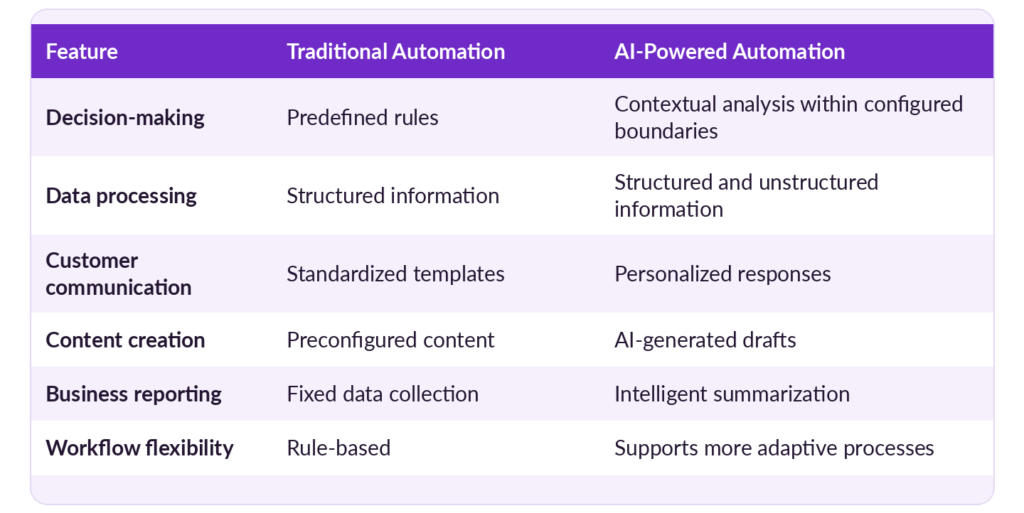
The most effective approach is often to combine both methods. Predictable business processes can follow fixed rules, while tasks requiring interpretation, personalization, or summarization can benefit from artificial intelligence.
Why Businesses Should Adopt AI Automation Before 2027
Growing a business traditionally means increasing resources, hiring additional employees, and investing in more software. However, this approach does not always address the underlying inefficiencies responsible for rising operational costs.
Many businesses already have the necessary applications but lack effective connections between them. Employees repeatedly transfer customer information, prepare reports, organize emails, and complete administrative activities that could be streamlined.
By implementing Make.com AI automations, businesses can improve how their existing applications work together rather than replacing their entire technology infrastructure.
The Hidden Cost of Repetitive Business Tasks
Consider a business that spends two hours every working day performing repetitive administrative tasks. Over approximately 260 working days, this represents 520 hours annually.
At an assumed labor cost of $25 per hour, those activities represent $13,000 in annual labor value. Although automation may not eliminate all of this work, reducing even a portion of it could create meaningful operational benefits.
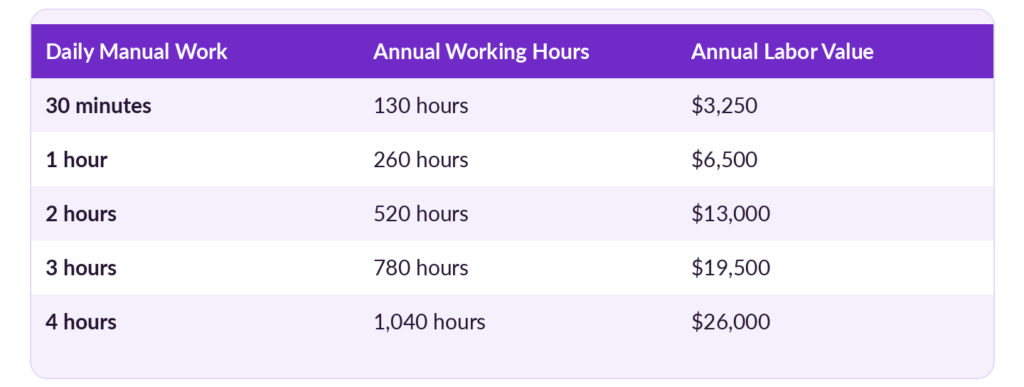
Estimates assume 260 working days annually and an hourly labor cost of $25. Actual savings depend on implementation costs, workflow reliability, and business requirements.
The objective of using Make.com is not necessarily to reduce the number of employees. Instead, it is to allow existing teams to spend less time performing repetitive tasks and more time developing customer relationships, improving services, and growing the business.
With another business year approaching, evaluating these operational inefficiencies now can help organizations establish a more productive foundation for 2027.
7 Powerful Make.com AI Automations Every Business Should Consider
The following automation examples address common operational challenges experienced by small businesses, marketing agencies, freelancers, e-commerce companies, and growing organizations. Each automation can be customized according to your existing applications, business requirements, and available resources.
1. Automate Lead Qualification With Artificial Intelligence
Generating leads is essential for business growth, but not every inquiry represents a valuable sales opportunity. Sales teams frequently spend considerable time reviewing prospects who may not meet their requirements, while genuinely interested customers wait for a response.
As lead volume increases, manually evaluating every inquiry becomes increasingly difficult. This can create inconsistencies in lead management and prevent sales representatives from focusing on the most promising opportunities.
With Make.com, businesses can develop an AI-powered lead qualification system that automatically evaluates incoming inquiries according to predefined business criteria.
How AI Lead Qualification Works
When a potential customer submits a website form or responds to an advertising campaign, an automated workflow can retrieve their contact information and inquiry details. Relevant information can then be processed by an AI model to evaluate the customer’s requirements, expressed interest, budget, and suitability for the service.
Based on this assessment, the workflow can categorize the lead, update the CRM, notify the appropriate salesperson, or initiate a relevant nurturing sequence.
By connecting lead generation applications with Make.com, businesses can establish a more organized sales process without requiring employees to review every submission individually.
Example Lead Qualification Workflow
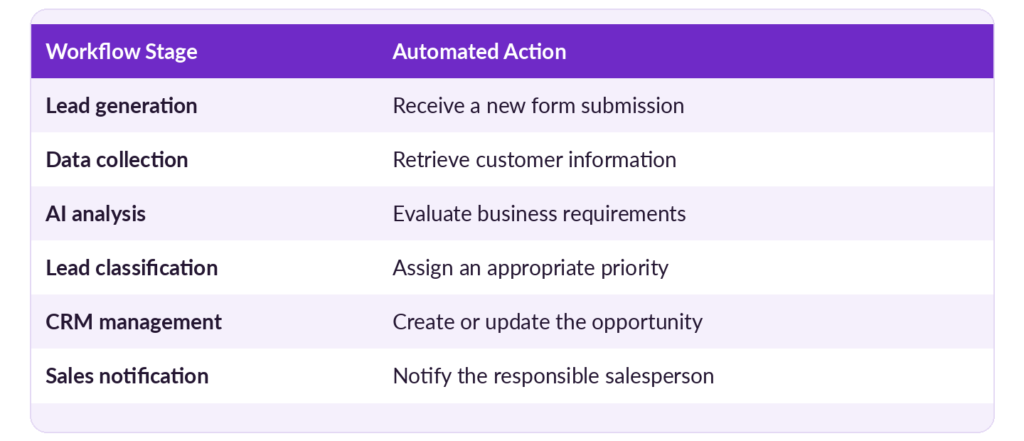
This automation is particularly useful for businesses generating leads through Meta Ads, Google Ads, website forms, and consultation booking funnels. Marketing agencies can also implement similar systems across client accounts, provided customer information and account permissions remain appropriately separated.
Businesses can start building an AI lead qualification workflow with Make.com and customize the qualification criteria according to their sales processes.
2. Stop Losing Potential Customers With Automated Follow-Ups
Businesses invest considerable resources in generating website traffic, running advertising campaigns, and attracting potential customers. However, sales opportunities can be lost because inquiries are not followed up consistently.
A potential customer may submit an inquiry while your sales team is busy, outside business hours, or attending another appointment. By the time someone responds, the prospect may already be communicating with another company.
Make.com enables businesses to create automated follow-up workflows that acknowledge incoming inquiries and maintain relevant communication throughout the sales process.
How Automated Lead Follow-Ups Work
When a prospect submits a form, Make can retrieve their contact details, identify the service they are interested in, and use AI to prepare a personalized acknowledgment.
The workflow can include relevant service information, an appointment booking link, or answers to frequently asked questions. It can also notify the sales team and record the interaction within the CRM.
Additional workflows can monitor whether the prospect has responded or scheduled an appointment. If appropriate, subsequent messages can be delivered according to predefined conditions.
Using Make.com, businesses can connect their CRM, email marketing applications, and appointment scheduling systems to create a consistent follow-up experience.
Example Automated Follow-Up Sequence
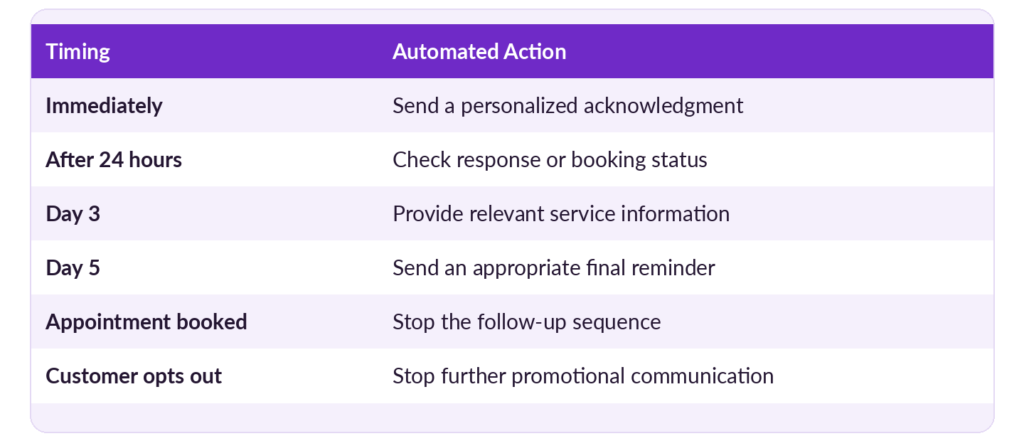
Unlike generic follow-up sequences, AI-assisted workflows can incorporate relevant details from previous customer interactions, allowing businesses to make their communication more personalized.
However, automated messages should respect customer consent, communication preferences, unsubscribe requests, and applicable messaging regulations.
If your business is already paying to generate leads, building an automated follow-up system with Make.com could help you make better use of those existing marketing investments.
3. Build a 24/7 AI Customer Support System
Customer support is one of the most time-consuming areas of business operations. Customers regularly ask similar questions regarding pricing, service availability, appointments, delivery information, and company policies.
While providing reliable support is essential, many routine inquiries do not require an employee to manually prepare a response.
With Make.com, businesses can connect artificial intelligence with communication channels and approved knowledge sources to develop automated customer support workflows.
How an AI Customer Support System Works
When a customer submits an inquiry through email, a website form, or an integrated communication channel, the workflow can analyze the request and identify the relevant information required to prepare a response.
The AI system can retrieve information from approved documents, frequently asked questions, product descriptions, or internal knowledge bases. It can then generate an appropriate answer or prepare a response for human approval.
For more complex inquiries, the workflow can forward the conversation to a customer support representative with a concise summary of the issue.
By implementing this system through Make.com, businesses can potentially improve the availability and consistency of routine customer support without proportionally increasing their administrative workload.
Business Applications of AI Customer Support
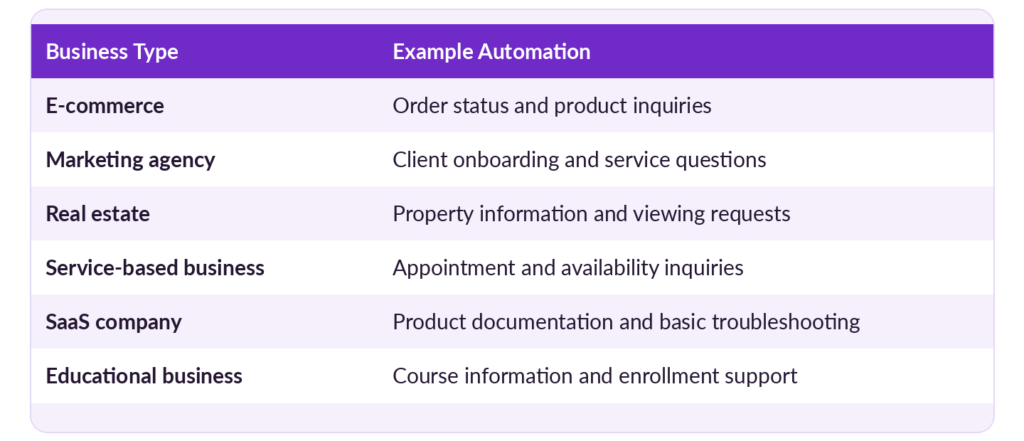
Make AI Agents can extend these capabilities by allowing businesses to configure agents with specific instructions, contextual information, and approved tools. For example, an AI support agent could determine whether an inquiry requires product information, an order status update, or escalation to a human representative.
Businesses looking to improve customer support availability can explore Make.com AI Agents and develop workflows around their most frequently received inquiries.
Sensitive account changes, financial disputes, confidential information, and complex customer complaints should continue to receive appropriate human oversight.
4. Automate Your Entire Content Creation Workflow
Consistent content creation has become essential for businesses looking to build digital authority, attract potential customers, and maintain visibility across online platforms. However, producing articles, social media posts, newsletters, and video scripts requires significant time and resources. Marketing teams often repeat similar research and writing activities when adapting the same content for different platforms.
Using Make.com, businesses can establish a connected content production system that transforms existing information into multiple marketing assets.
Turn One Article Into Multiple Content Assets
Consider a business that publishes a detailed educational article on its website. Instead of manually developing separate promotional content for each marketing channel, an automated workflow can retrieve the article and send it to an AI model for analysis.
The AI model can prepare a LinkedIn post, Instagram caption, newsletter draft, carousel outline, and short-form video script based on the original article. These assets can then be transferred to Google Docs, Notion, Airtable, or another content management application for editorial review.
Through Make.com, businesses can connect the content creation, approval, and publishing stages within a coordinated workflow rather than managing each process independently.
Example Content Repurposing Workflow
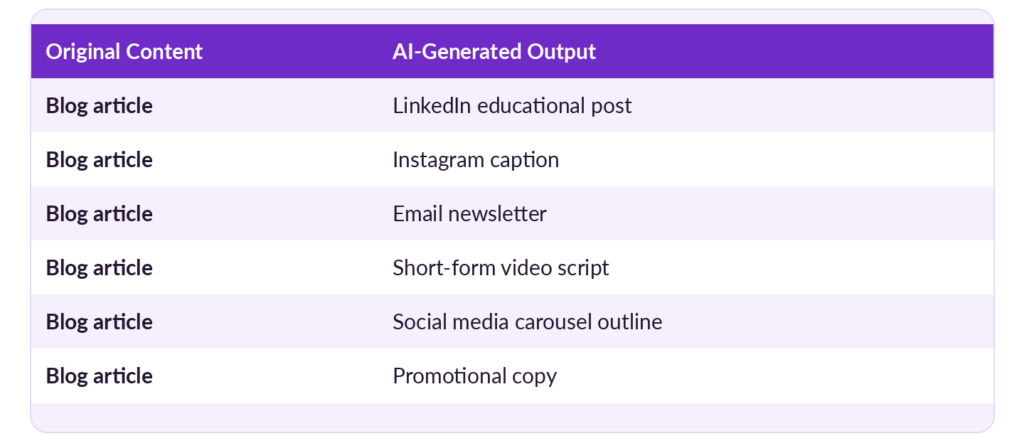
This approach is particularly valuable for affiliate marketers, marketing agencies, content creators, and businesses managing multiple online platforms. It allows teams to dedicate more attention to research, creative direction, and content quality rather than repeatedly completing the same formatting and repurposing activities.
You can build a content automation workflow using Make.com by connecting your existing publishing platform with an AI provider and content management system.
Human editorial review remains essential for maintaining factual accuracy, originality, brand consistency, and publishing quality.
5. Automate Invoicing and Financial Administration
Managing invoices, recording customer payments, organizing financial information, and sending payment reminders are essential business responsibilities. However, these activities often require employees to repeatedly enter information across several applications.
For freelancers, service providers, and agencies managing multiple clients, financial administration can become increasingly time-consuming as the business grows.
Make.com allows businesses to connect accounting applications, payment processors, CRM platforms, and communication tools to streamline routine financial administration.
How Financial Automation Works
When a customer accepts a proposal or reaches an approved stage within a sales pipeline, an automated workflow can retrieve their customer information and approved service details.
The workflow can then prepare an invoice using an integrated accounting application. Once the invoice is approved and a payment is received, the appropriate customer and accounting records can be updated automatically.
Additional workflows can monitor outstanding payments and prepare relevant reminders according to predefined business policies.
By connecting financial applications through Make.com, businesses can reduce repetitive data entry and improve consistency across their administrative processes.
Common Financial Automation Use Cases
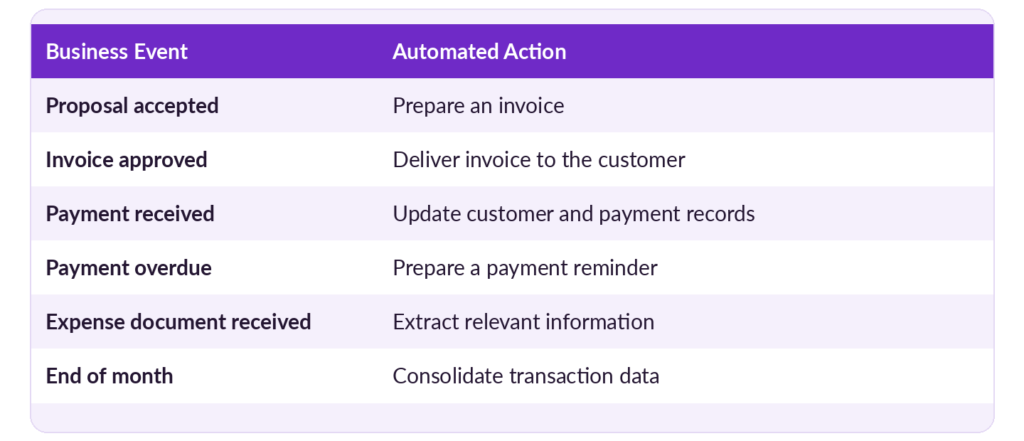
Artificial intelligence can also assist with extracting information from receipts, organizing documentation, and preparing financial summaries for review.
Businesses using applications such as Stripe, QuickBooks, Xero, and Google Sheets can explore financial automation with Make.com to identify processes that could be streamlined.
Financial calculations, tax classifications, payment authorizations, and official accounting records should remain subject to appropriate validation and qualified human oversight.
6. Create an AI Email Assistant for Your Business
Email remains one of the most important communication channels for businesses. However, managing large volumes of incoming messages can interrupt productive work and make it difficult to identify conversations requiring immediate attention.
Business owners frequently switch between sales inquiries, customer support requests, internal communications, meeting invitations, invoices, and routine administrative correspondence.
An AI email assistant built with Make.com can help organize these communications by automatically classifying messages, identifying priorities, and preparing relevant responses.
How an AI Email Assistant Works
When a new email arrives, the workflow can retrieve the permitted content and send relevant information to an AI model for analysis. The model can determine whether the message relates to a sales opportunity, customer complaint, meeting request, financial document, or general inquiry.
Based on this classification, the workflow can apply an appropriate email label, create a CRM opportunity, notify a team member, or prepare a draft response.
Through Make.com, an email assistant can also connect with calendars, project management applications, customer databases, and internal communication tools.
What an AI Email Assistant Can Automate
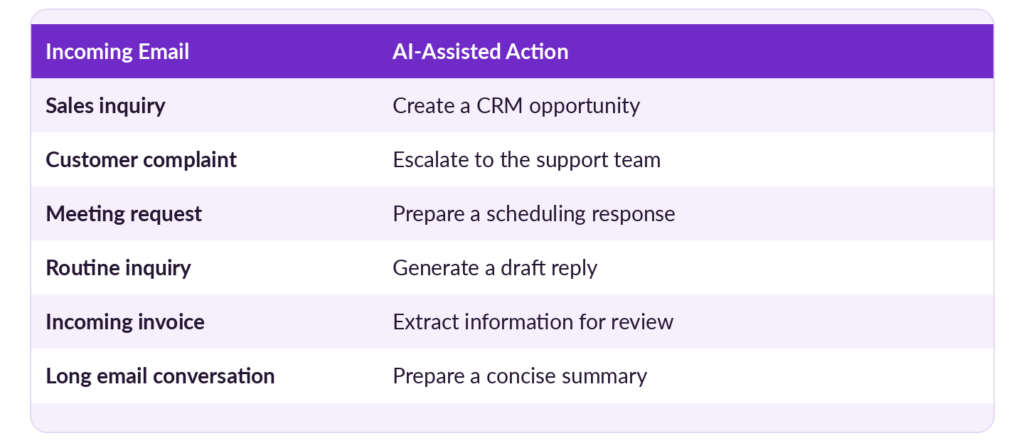
For example, a client requesting a project update could trigger a workflow that retrieves the latest project information and prepares a relevant email draft. The responsible employee can then review and approve the response before sending it.
This approach helps reduce repetitive administrative work while maintaining control over important business communication.
Businesses can create their own AI email assistant with Make.com by integrating Gmail or Microsoft Outlook with their preferred AI provider and existing business applications.
Confidential correspondence and sensitive information should be protected through appropriate permissions, data handling practices, and human approval procedures.
7. Automate Business Reporting and Performance Analysis
Business reporting plays an important role in evaluating performance, identifying operational challenges, and making informed decisions. However, relevant performance data is frequently distributed across several applications.
A marketing agency may need to retrieve information from Meta Ads, Google Ads, Google Analytics, spreadsheets, and CRM platforms before preparing a comprehensive client report. When this process is repeated across multiple accounts every week or month, reporting becomes a substantial administrative responsibility.
With Make.com, businesses can establish scheduled workflows that automatically collect and consolidate performance information from connected applications.
How Automated Business Reporting Works
A scheduled scenario can retrieve advertising expenditure, lead volume, website traffic, appointment bookings, and other relevant performance indicators from authorized data sources.
The information can then be organized into a spreadsheet, dashboard, or reporting application. An AI model can assist with preparing a written summary of performance trends, notable changes, and areas requiring further investigation.
The completed report can be delivered automatically to the relevant employees, management team, or clients through email or internal communication applications.
By implementing automated reporting through Make.com, businesses can reduce the time spent collecting information and dedicate more attention to evaluating results.
Examples of Automated Business Reports
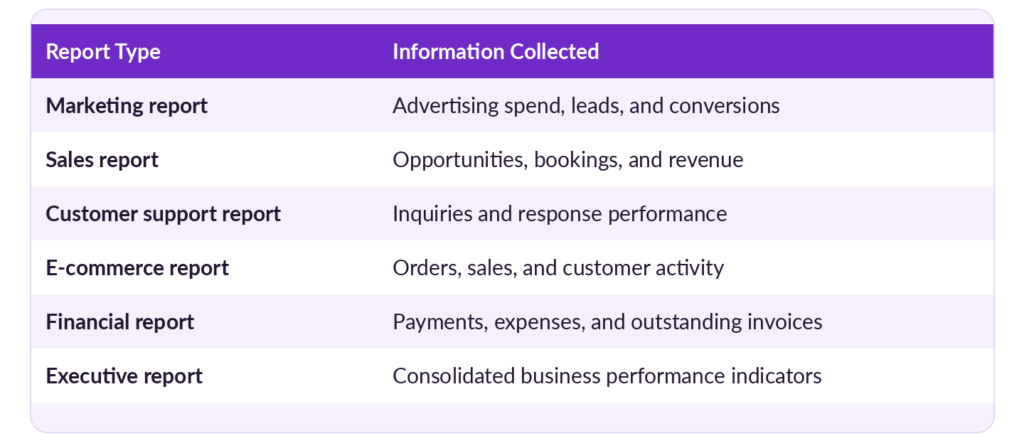
This automation is particularly useful for marketing agencies and businesses that manage multiple advertising channels or customer acquisition systems.
Rather than preparing every report manually, teams can build an automated reporting system with Make.com and establish a consistent reporting schedule.
AI-generated interpretations should be reviewed against verified source data, especially when reports involve financial results, marketing attribution, or strategic business decisions.
Make.com AI Agents: The Next Stage of Business Automation
Artificial intelligence is gradually changing how businesses approach workflow automation. Instead of relying exclusively on predefined instructions, organizations can introduce AI systems capable of assisting with tasks that require contextual understanding.
Make AI Agents allow businesses to configure intelligent systems with defined responsibilities, instructions, contextual information, and approved tools.
With Make.com AI Agents, businesses can develop more flexible workflows that support customer service, sales management, research, content creation, and administrative activities.
What Makes AI Agents Different From Traditional Workflows?
Traditional workflows execute a predetermined sequence of actions whenever a specific trigger occurs. This approach is reliable for predictable tasks such as updating a spreadsheet, sending a notification, or transferring contact information.
AI agents can support processes that involve interpreting a request and identifying an appropriate action within configured boundaries. For example, a customer support agent may need to determine whether a customer requires product information, an appointment change, or assistance from a human representative.
By combining AI agents with conventional scenarios in Make.com, businesses can establish systems that support both predictable processes and more complex operational requirements.
Building a Specialized AI Workforce With Make.com
Rather than relying on a single AI assistant to perform every task, businesses can develop specialized agents around individual responsibilities.
A sales agent can assist with evaluating incoming inquiries, while a customer support agent can retrieve relevant information from approved documentation. Separate agents can also assist with content production, business research, and reporting.
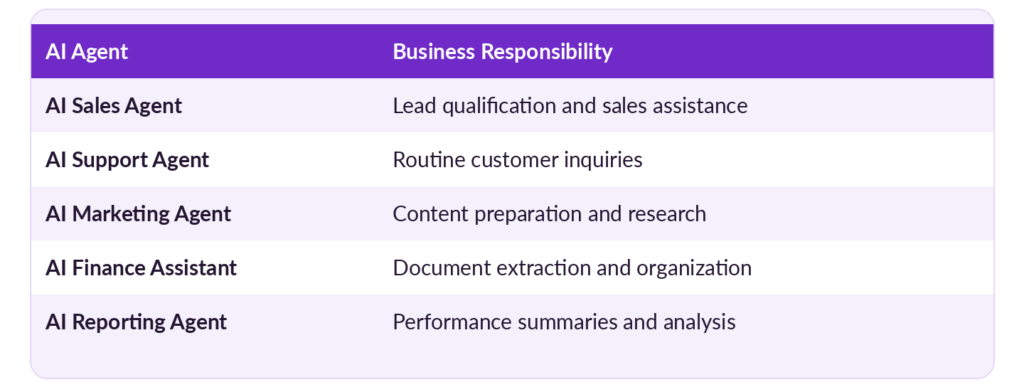
Creating specialized agents through Make.com allows businesses to define clearer responsibilities and establish appropriate permissions for each operational area.
However, AI agents should not be treated as unrestricted replacements for employees. Business-critical decisions, sensitive information, financial authorizations, and irreversible actions require suitable controls and human oversight.
Maia by Make: Build Automations Using Natural Language
One of the traditional barriers to adopting automation has been the learning curve associated with building workflows, configuring integrations, and understanding how information moves between applications.
Maia, Make’s conversational AI assistant, is designed to address this challenge by assisting users with creating, modifying, and troubleshooting scenarios through natural-language instructions.
Instead of configuring every workflow component independently, users can describe what they want to achieve. Maia can assist with developing a scenario that connects relevant applications and performs the requested tasks.
For example, a business owner could describe a workflow that collects new customer inquiries, summarizes them using AI, and sends notifications to a sales team.
By exploring Maia within Make.com, businesses can potentially reduce the initial complexity associated with implementing new automation ideas.
Generated scenarios should still be reviewed and tested before being activated, particularly when they interact with live customer information or business-critical applications. Feature availability and usage limits may depend on the selected subscription.
How to Get Started With Make.com AI Automations
Getting started with automation does not require transforming every business process simultaneously. A more practical approach is to identify one operational challenge, create a workflow around it, and evaluate the results before expanding further.
Step 1: Create Your Make.com Account
The first step is to register for a free Make.com account. Once registered, you can explore the visual workflow builder, available application integrations, and automation templates.
The free plan provides an opportunity to understand how the platform works before investing in a paid subscription.
Step 2: Identify a Repetitive Business Process
Choose a process that frequently consumes valuable time or creates operational inefficiencies. Common examples include lead management, customer follow-ups, appointment reminders, email organization, and weekly reporting.
Before developing a workflow, clearly define the information required, the actions involved, and the expected outcome. This approach helps ensure that your first Make.com automation addresses a genuine business requirement rather than introducing unnecessary complexity.
Step 3: Connect Your Business Applications
Create a new scenario within Make and select the applications involved in your chosen business process. For example, an automated lead management workflow could connect a website form, OpenAI, Google Sheets, and your CRM. Each application performs a specific action within the overall scenario.
The visual builder available in Make.com allows you to configure these connections, map relevant information, and establish conditions for different workflow outcomes.
Step 4: Add Artificial Intelligence Where Necessary
Artificial intelligence should be introduced where it provides meaningful operational value. Predictable processes such as transferring contact information, updating a payment status, or sending a scheduled notification may work effectively using conventional automation.
AI becomes particularly useful when a workflow requires interpreting customer inquiries, summarizing information, categorizing data, or generating personalized content.
Businesses can experiment with these capabilities through Make.com and determine which tasks benefit most from AI-assisted processing.
Step 5: Test and Activate Your Workflow
Before activating an automation, test the scenario using representative sample data. Confirm that each connected application receives the correct information and that the workflow produces the expected results. Establish appropriate error-handling procedures and review the permissions granted to each connected application.
Once the automation operates reliably, activate it and monitor its performance, credit consumption, and operational impact.
As your requirements grow, you can expand your Make.com automation system by introducing additional scenarios and more advanced AI capabilities.
Make.com Pricing: Which Plan Is Right for Your Business?
Choosing an automation platform requires evaluating more than its subscription price. Businesses should consider workflow volume, application requirements, AI usage, collaboration features, and the operational value they expect to receive.
Make.com offers multiple subscription tiers designed to accommodate different automation requirements, from individuals experimenting with basic workflows to organizations managing more advanced automation systems.
Make.com Plans Comparison
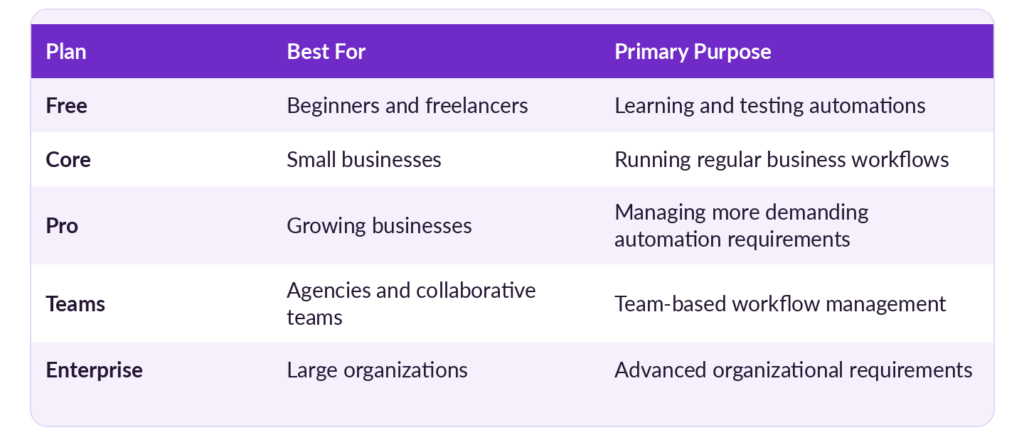
Subscription costs depend on the selected plan, credit allowance, billing cycle, and applicable pricing at the time of purchase.
Make uses a credit-based pricing system. Standard module actions generally consume credits, while certain AI-powered features may have additional or variable credit requirements. External AI providers and connected applications may also have separate subscription or usage-based charges.
For businesses exploring automation for the first time, the most practical approach is to start with Make.com’s free plan and upgrade when additional capacity or subscription features become necessary.
Understanding Make.com Credit Consumption
Before selecting a paid subscription, businesses should understand how frequently their workflows will operate and how many actions each execution requires.
For example, a lead management scenario may retrieve a new form submission, analyze customer information, update a CRM record, send an email, and notify a salesperson. Each of these actions contributes to the overall workflow usage.
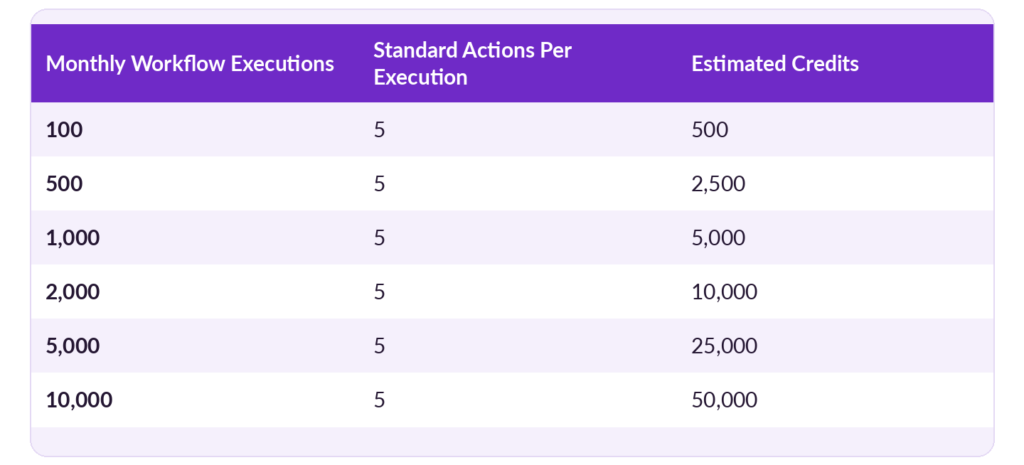
These estimates assume one credit per standard action and exclude additional AI consumption, polling, retries, and other workflow-specific factors.
Businesses can monitor their actual consumption within Make.com and select a subscription that aligns with their operational requirements. This approach is more effective than purchasing a large automation plan before understanding how the platform will be used.
How Much Can Businesses Save With Make.com?
The financial benefits of automation depend on the complexity of the process, the amount of manual work involved, implementation expenses, and ongoing software costs.
A workflow that saves only a few minutes every day can create meaningful operational value when repeated across multiple employees, customer accounts, or business departments.
Before implementing Make.com, businesses should estimate the amount of time currently spent on repetitive tasks and determine which activities can realistically be automated.
Example Business Automation ROI
Consider a business that spends 20 hours per week managing repetitive administrative activities. If an automation system can reliably reduce that workload by 50%, the business could reclaim approximately 10 hours per week.
At an assumed labor value of $25 per hour, this represents $250 in weekly productivity value or approximately $13,000 annually.
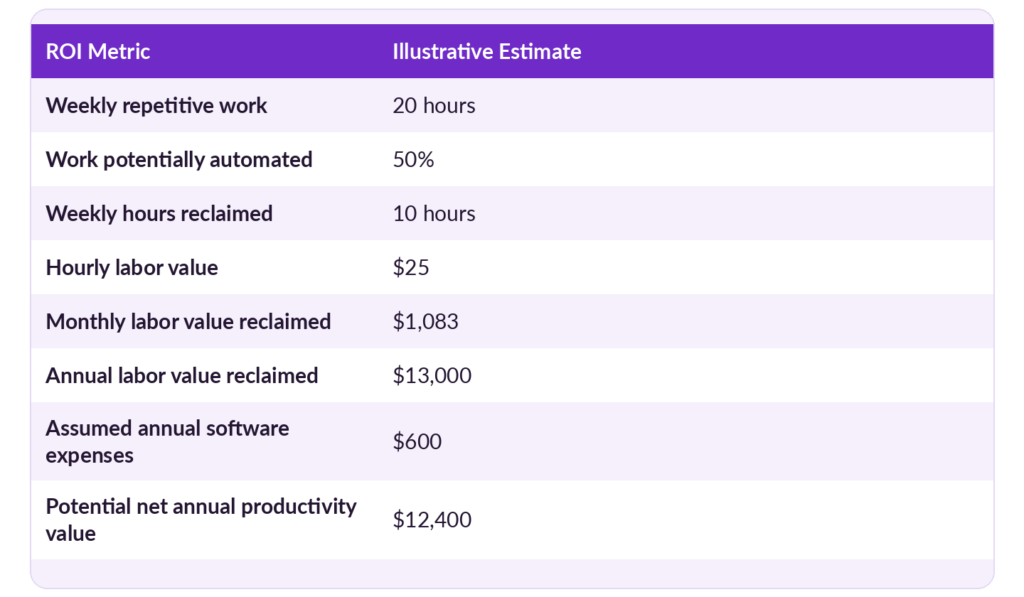
This example is illustrative, not a guaranteed financial result. It excludes initial implementation, employee training, maintenance labor, and other potential expenses. Reclaimed productivity does not necessarily translate into direct cash savings.
By starting with Make.com, businesses can evaluate individual workflows and measure their actual operational impact before expanding their automation investment.
The greatest benefit may come from using reclaimed time to manage more customers, develop new services, improve customer experiences, and pursue additional revenue opportunities.
Who Should Use Make.com in 2026?
Make.com is particularly valuable for businesses that rely on multiple applications and regularly perform repetitive activities across disconnected systems.
Small Business Owners
Small businesses often operate with limited resources, requiring employees to manage several responsibilities simultaneously. Automating routine administrative tasks can help these businesses improve operational consistency without immediately expanding their teams.
With Make.com, small businesses can connect their CRM, email applications, appointment scheduling systems, and accounting software to streamline everyday processes.
Marketing Agencies
Marketing agencies frequently manage multiple advertising accounts, client reports, lead generation campaigns, and content production workflows.
Make allows agencies to build reusable automation scenarios that can be adapted according to individual client requirements. These workflows can support lead distribution, CRM updates, campaign reporting, and content repurposing.
Agencies can explore Make.com for their business and develop automation systems that reduce repetitive client management activities while maintaining appropriate data separation.
E-Commerce Businesses
E-commerce businesses depend on efficient coordination between order management systems, inventory applications, customer support channels, and marketing platforms.
Automated workflows can help manage order notifications, customer inquiries, payment updates, and other recurring operational activities.
By connecting these applications through Make.com, online retailers can establish more consistent business processes as their operations grow.
Freelancers and Content Creators
Freelancers and content creators often spend significant time managing administrative responsibilities alongside their primary work.
Activities such as preparing invoices, organizing customer inquiries, managing content schedules, and sending follow-ups can reduce the time available for creative or revenue-generating activities.
Using Make.com, independent professionals can develop lightweight automation systems around their most time-consuming responsibilities.
Common Make.com Automation Mistakes to Avoid
Although automation can deliver substantial operational benefits, poorly designed workflows may create new challenges. Businesses should approach automation strategically rather than assuming every existing process needs to become automated.
Automating Inefficient Business Processes
Automating a poorly designed process does not necessarily improve its effectiveness. Before developing a workflow, businesses should evaluate whether the existing process can be simplified. A clearly defined process is generally easier to automate, monitor, and maintain.
Using AI for Every Task
Artificial intelligence is useful for contextual analysis, summarization, classification, and content generation. However, predictable tasks often operate more reliably using predefined rules.
When building workflows in Make.com, businesses should evaluate whether AI genuinely improves the process or simply introduces additional complexity and expenses.
Ignoring Credit Consumption
Complex workflows, frequent scheduled checks, additional AI processing, and unnecessary application actions can increase credit consumption. Monitoring actual usage allows businesses to optimize scenarios and select subscription plans based on genuine requirements.
Activating Workflows Without Proper Testing
Automation errors can result in duplicate records, incorrect messages, inaccurate reporting, and unintended business actions.
Before activating scenarios in Make.com, businesses should test their workflows thoroughly and establish appropriate error-handling procedures.
Giving AI Agents Excessive Permissions
AI agents should operate within defined responsibilities. Sensitive customer information, financial transactions, confidential documentation, and irreversible actions should remain protected through appropriate access restrictions and human approval.
The most effective Make.com AI automations are those that balance operational efficiency with reliability, security, and appropriate oversight.
Frequently Asked Questions
Is Make.com free to use?
Yes. Make offers a free plan that allows users to explore its visual workflow builder and create basic automation scenarios within the available plan limits. Individuals and businesses can create a free Make.com account before deciding whether a paid subscription is necessary.
Can I use Make.com without coding experience?
Yes. Make provides a visual automation builder that allows users to connect applications and configure workflows without traditional programming. However, advanced integrations may require an understanding of APIs, data structures, conditional logic, and application-specific requirements.
Can Make.com integrate with ChatGPT?
Make supports OpenAI integrations that allow businesses to incorporate AI-powered text generation, data classification, summarization, and other capabilities into automated workflows.
Through Make.com, businesses can connect AI models with existing applications and develop more practical operational systems.
Is Make.com suitable for small businesses?
Yes. Make is particularly useful for small businesses that manage repetitive administrative activities across multiple applications. Businesses can begin with simple automations such as lead notifications, customer follow-ups, appointment reminders, and email organization before expanding into more advanced workflows.
Can Make.com build AI agents?
Yes. Make provides AI agent capabilities that allow users to configure intelligent agents with defined instructions, contextual information, and approved tools. Businesses can explore Make.com AI Agents and develop agents around specific operational responsibilities.
What is the difference between Make.com and Zapier?
Both platforms enable businesses to connect applications and automate workflows. Make emphasizes visual scenario building, flexible workflow logic, and data transformations, while Zapier is widely used for straightforward application integrations. The most suitable platform depends on your automation requirements, technical experience, available integrations, and expected workflow volume.
Can Make.com reduce business operating costs?
Make can potentially reduce the amount of manual work required to complete repetitive tasks. However, actual financial benefits depend on implementation expenses, software costs, workflow reliability, and existing business processes. Businesses should evaluate these factors before expanding their automation investment.
Can marketing agencies use Make.com for multiple clients?
Yes. Marketing agencies can use Make to build lead management workflows, automate client reporting, streamline onboarding, and connect marketing applications.
Agencies using Make.com should maintain appropriate separation between client credentials, customer information, workflow configurations, and application permissions.
When should I upgrade to a paid Make.com plan?
Businesses should consider upgrading when their workflow volume exceeds the free plan’s available resources or when additional subscription features become necessary. Monitoring actual credit consumption is one of the most effective ways to determine which paid subscription is appropriate.
Is Make.com worth using before 2027?
Make is worth considering if your business regularly spends time transferring information between applications, managing repetitive inquiries, preparing reports, or completing administrative processes. Starting with one high-impact workflow provides an opportunity to evaluate the platform’s practical benefits before committing to a broader automation strategy.
Final Verdict: Is Make.com Worth Using Before 2027?
As businesses prepare for 2027, operational efficiency is becoming increasingly important. Organizations that continue to rely heavily on disconnected applications and repetitive manual processes may find it more difficult to manage growing workloads effectively.
Make.com provides a flexible platform for connecting existing business applications, developing intelligent workflows, and incorporating artificial intelligence into everyday operations.
Whether your immediate challenge involves missed sales opportunities, delayed customer responses, time-consuming content production, or repetitive administrative responsibilities, Make allows you to develop automation systems around those specific business problems.
One of the platform’s most practical advantages is that businesses do not need to make a substantial initial commitment. They can begin with a free account, test a representative workflow, measure the results, and gradually expand their automation capabilities.
The key is not to automate everything immediately. It is to identify the repetitive processes that consume the most valuable time and develop reliable systems that improve how those processes operate.
As another business year approaches, now is a practical opportunity to reconsider which tasks your team should continue managing manually and which could be handled through intelligent automation.
Get started with Make.com for free and take the first step toward a smarter, more efficient business before 2027.
Need Expert Help With Business Automation?
Choosing the right automation platform is only the beginning. Building reliable workflows, connecting multiple applications, and implementing AI agents requires a strategy that aligns with your business objectives.
If you are unsure where to start or want to avoid the complexity of implementing automation yourself, professional guidance can help you identify the right opportunities and build a system tailored to your business.
Muhammad Nouman, Certified GoHighLevel Expert and Founder of Ignitto, specializes in AI-powered business automation, CRM implementation, advanced workflows, API integrations, and scalable business systems.
Whether you need to automate lead management, integrate Make.com with your existing CRM, implement AI agents, or streamline your business operations, a personalized consultation can help you identify the most effective path forward.
During the consultation, you can discuss your existing business processes, identify automation opportunities, evaluate potential integrations, and explore solutions tailored to your operational requirements.
Book a 15-Minute Automation Strategy Call With Muhammad Nouman and discover how intelligent automation can help your business save time, improve efficiency, and scale more effectively.
Affiliate Disclosure
This article contains affiliate links. If you register and purchase an eligible subscription through one of these links, I may earn a commission at no additional cost to you. The information and recommendations provided are intended to help readers evaluate Make.com based on their individual business and automation requirements.
Read more articles at iloveGHL






Be First to Comment