Cold email remains one of the most effective ways to generate qualified leads, book meetings, and grow a B2B business. Despite the rise of social selling and AI-powered marketing, email continues to be the preferred communication channel for many decision makers. The challenge, however, isn’t sending emails, it’s making sure they actually reach the inbox and start meaningful conversations.
This is where Instantly.ai stands out. More than just a cold email platform, it provides everything you need to build and scale a complete outreach system, from inbox warm-up and email deliverability to lead generation, AI personalization, campaign management, and analytics.
In this guide, we’ll show you how to use Instantly.ai for cold email step by step. You’ll learn how to set up your sending infrastructure, build a targeted prospect list, create campaigns that get replies, avoid common mistakes, and optimize your outreach as you grow. Whether you’re a freelancer, agency owner, SaaS founder, or sales team, this guide will help you build a cold email system that is designed to scale. If you’re planning to implement everything as you read, it’s worth creating an Instantly.ai account beforehand so you can explore each feature inside the platform as we cover it. Let’s get started with Instantly.ai
What is Instantly.ai?
If you’re wondering how to use Instantly.ai for cold email in 2026, it starts with understanding how the platform combines lead generation, inbox warm-up, AI personalization, and campaign management into one system.
Instantly.ai is an AI-powered cold email platform designed to help businesses find prospects, send personalized outreach at scale, and improve email deliverability, all from a single dashboard. Instead of juggling multiple tools for inbox warm-up, lead generation, email verification, campaign management, and analytics, Instantly.ai brings everything together into one streamlined platform.
What makes Instantly.ai stand out is that it focuses on the entire cold outreach process, not just sending emails. You can connect multiple sending inboxes, warm them up to build a strong sender reputation, discover verified B2B leads using its built-in database, personalize emails with AI, automate follow-up sequences, and track campaign performance,all without switching between different tools.
Whether you’re a freelancer, agency owner, SaaS founder, or sales team, Instantly.ai is built to simplify outbound sales while helping you scale your outreach without sacrificing deliverability or personalization.
Why Use Instantly.ai for Cold Email?
Running a successful cold email campaign today is about much more than writing a good email. You need healthy sending inboxes, verified prospect lists, personalized messaging, follow-up sequences, and reliable analytics to understand what’s working. Managing all of this manually can quickly become overwhelming, especially as you start scaling your outreach.
This is where Instantly.ai for cold email makes a real difference. Instead of relying on multiple tools, it brings your outreach workflow into one platform. From warming up new inboxes and finding verified leads to creating campaigns, automating follow-ups, and tracking replies, every part of the process is designed to work together.
Whether your goal is booking more sales calls, generating qualified leads, or building a predictable outbound system, Instantly.ai helps you spend less time managing tools and more time having conversations with potential customers.
Step 1: Create Your Instantly.ai Account
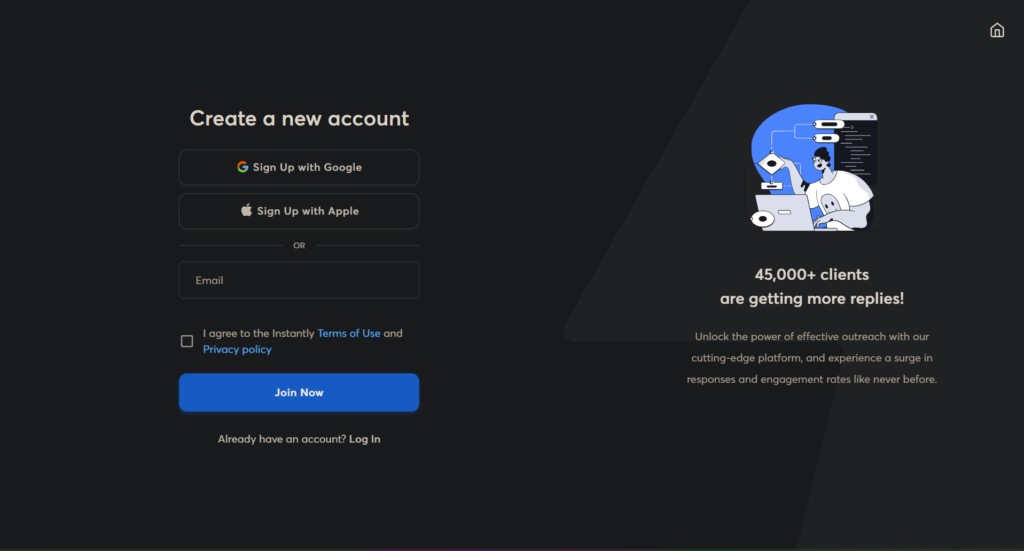
Now that you understand what the platform offers, let’s walk through how to use Instantly.ai for cold email in 2026 step by step. Before you can launch your first cold email campaign, you’ll need an Instantly.ai account. The signup process takes just a few minutes, and once you’re inside, you’ll have access to your dashboard where you’ll manage inboxes, campaigns, leads, analytics, and more.
If you’re following this guide step by step, now is a good time to create your account so you can complete each stage alongside the tutorial.
💡 Pro Tip: Don’t rush into sending emails immediately. A proper cold email setup starts with your sending infrastructure, not your campaign. Taking a few extra minutes now will significantly improve your deliverability later.
Step 2: Set Up Your Sending Infrastructure
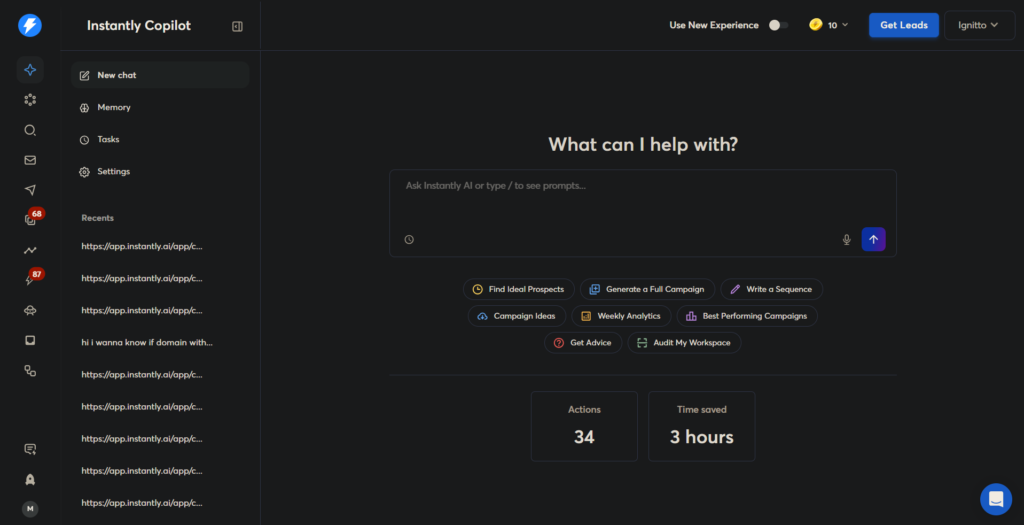
Before you write your first cold email or import a single lead, you need to build a strong sending infrastructure.
This is one of the biggest reasons cold email campaigns fail. Most beginners connect their primary business email, upload a list of prospects, and start sending hundreds of emails on day one. The result? Poor deliverability, spam folder placement, or even a damaged domain reputation.
A proper setup ensures your emails reach your prospects’ inboxes instead of their spam folder.
Why You Should Never Use Your Primary Business Email
Your primary business email is valuable. It’s the address you use for clients, invoices, meetings, and day-to-day communication. Cold outreach carries more risk because you’re emailing people who don’t know you yet. Even with good intentions, some emails may bounce, be ignored, or be marked as spam.
Instead of risking your main domain, create dedicated sending inboxes specifically for outbound campaigns.
Example:
❌ hello@yourcompany.com (Main Business Inbox)
✅ contact@yourcompany.co
✅ team@yourcompanymail.com
✅ connect@yourbrand.co
Keeping your outreach separate protects your primary domain while giving you room to scale safely.
Purchase Additional Domains
Rather than sending from just one domain, experienced outbound teams purchase several similar domains that closely match their primary brand.
For example, if your business is:
simplist.com
You could also purchase:
- simplist.co
- simplistmedia.co
- getsimplist.com
- trysimplist.com
These domains look trustworthy while protecting your main website’s reputation.
Create Multiple Sending Inboxes
Once you’ve purchased your domains, create multiple email accounts on each one.
For example:
- contact@
- hello@
- team@
- support@
- growth@
This allows you to spread your sending volume across several inboxes instead of relying on one. A common best practice is to keep each inbox sending a relatively low number of emails per day rather than pushing hundreds through a single address.
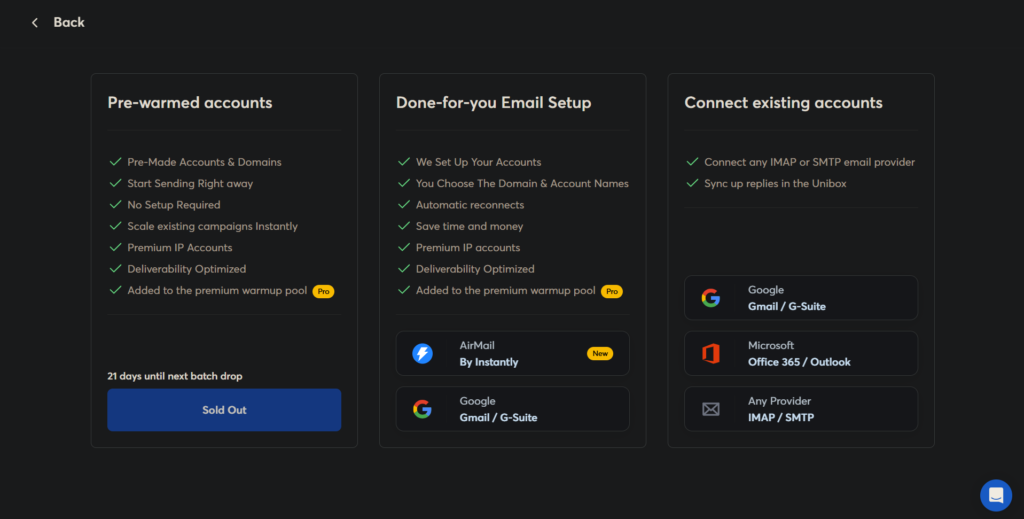
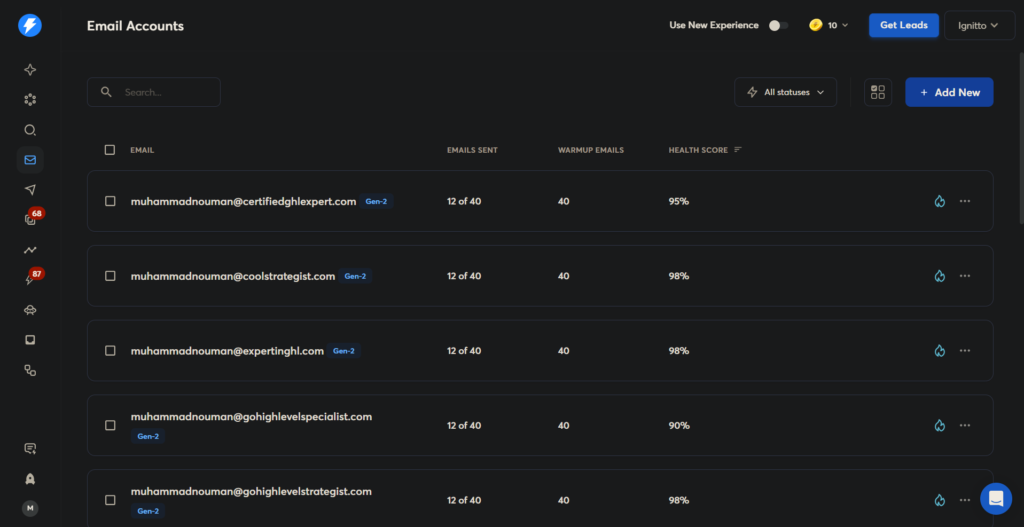
Connect Your Inboxes to Instantly.ai
Now head to Settings → Email Accounts inside Instantly.ai and connect all of your sending inboxes.
Once connected, Instantly.ai will manage them from a single dashboard, making it easy to organize campaigns and monitor inbox health.
Pro Tip: Even if you’re only planning to send 100 emails a day today, set up your infrastructure correctly from the beginning. Scaling later becomes much easier when the foundation is already in place.
Step 3: Warm Up Your Email Accounts
Once your sending inboxes are connected, resist the urge to launch your first campaign immediately.
New email accounts have little to no sender reputation. If you suddenly start sending hundreds of cold emails, email providers like Google and Microsoft may see that behavior as suspicious, causing your messages to land in spam, or not get delivered at all.
That’s why warming up your inboxes is essential.
What Is Email Warm-Up?
Email warm-up is the process of gradually building trust with email providers by sending and receiving natural email conversations over time.
Instead of sending cold emails to real prospects, your inbox exchanges emails with other trusted inboxes in a warm-up network. These emails are opened, replied to, and marked as important, helping establish your sender reputation before you begin outreach.
Think of it like breaking in a new engine, you don’t push it to its limits on day one.
How Instantly.ai for cold Email Warm-Up Works
One of Instantly.ai’s biggest advantages is its built-in warm-up network.
After connecting your inboxes, you can enable WarmUp with a single click. Instantly.ai automatically starts generating realistic email conversations between your inboxes and thousands of other participating accounts.
Behind the scenes, the platform helps:
- 📩 Send natural emails
- 💬 Generate replies automatically
- ⭐ Mark messages as important
- 📥 Move emails out of spam folders
- 📈 Build your sender reputation over time
This all happens automatically, so you don’t need to manage the process manually.
How Long Should You Warm Up?
There’s no perfect number, but a good rule is to warm up a brand-new inbox for 2–3 weeks before using it for large-scale cold outreach.
If you’re in a hurry, you can begin sending small volumes after the first week, as long as your daily sending limits remain low and you increase them gradually.
The goal isn’t speed. It’s consistent.
Step 4: Find High-Quality Leads with Instantly.ai
Even the best cold email won’t generate results if it’s sent to the wrong people.
Before you write a subject line or hit “Launch,” you need a list of prospects who actually fit your ideal customer profile. The more relevant your audience, the higher your reply rate and the more meetings you’ll book.
One of Instantly.ai’s biggest advantages is its built-in B2B Lead Finder, which gives you access to millions of verified business contacts without relying on third-party databases.
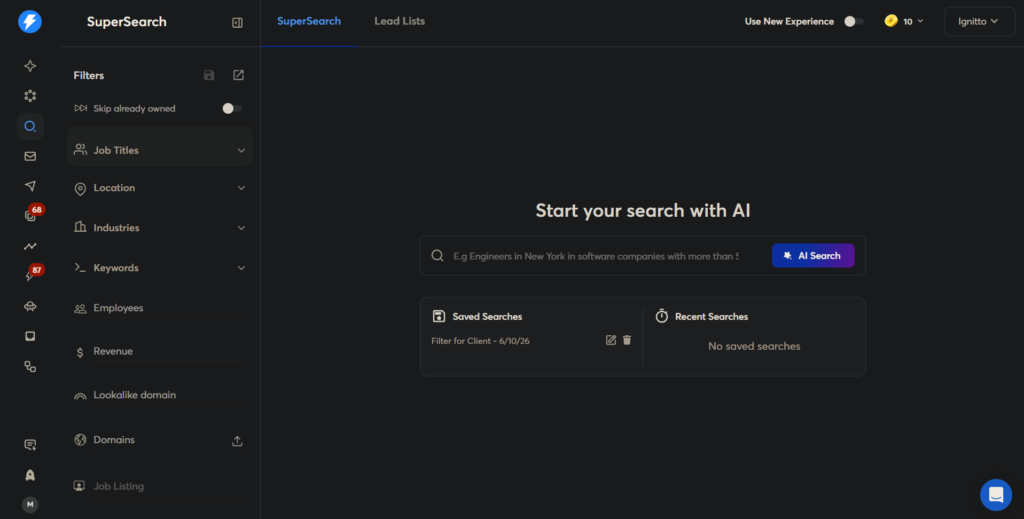
Using the Lead Finder
Navigate to Leads → Find Leads from the sidebar.
Here, you can search for prospects using dozens of filters, including:
- Location
- Industry
- Job Title
- Company Size
- Revenue
- Technologies Used
- Website Keywords
Instead of downloading massive lead lists, focus on building a highly targeted audience that closely matches your ideal customer.
Quality beats quantity every time.
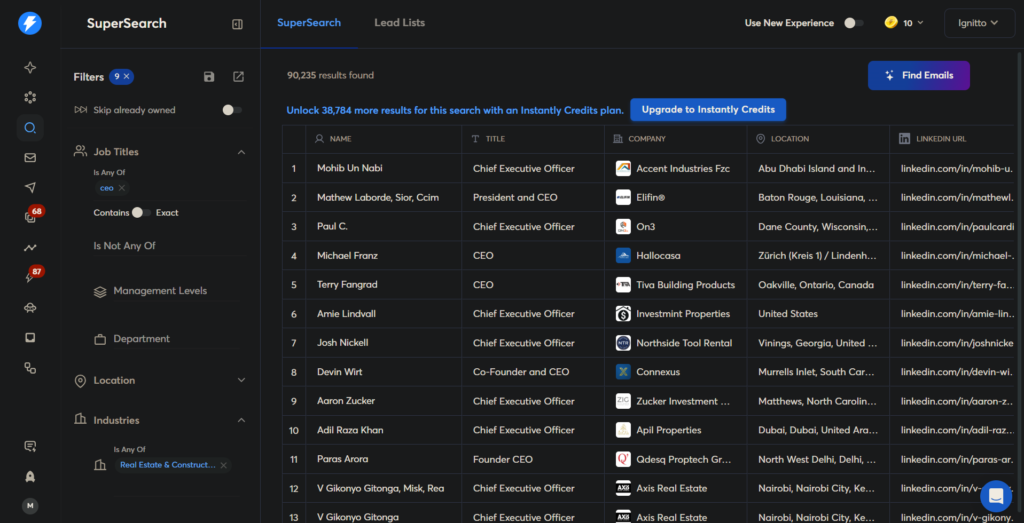
Example Search
Let’s say you run a marketing agency that helps dental clinics.
Your filters might look like this:
- Industry: Dental Practice
- Country: United States
- Company Size: 5–50 Employees
- Job Title: Owner, Founder, Practice Manager
Within seconds, Instantly.ai returns a list of verified prospects that match your criteria.
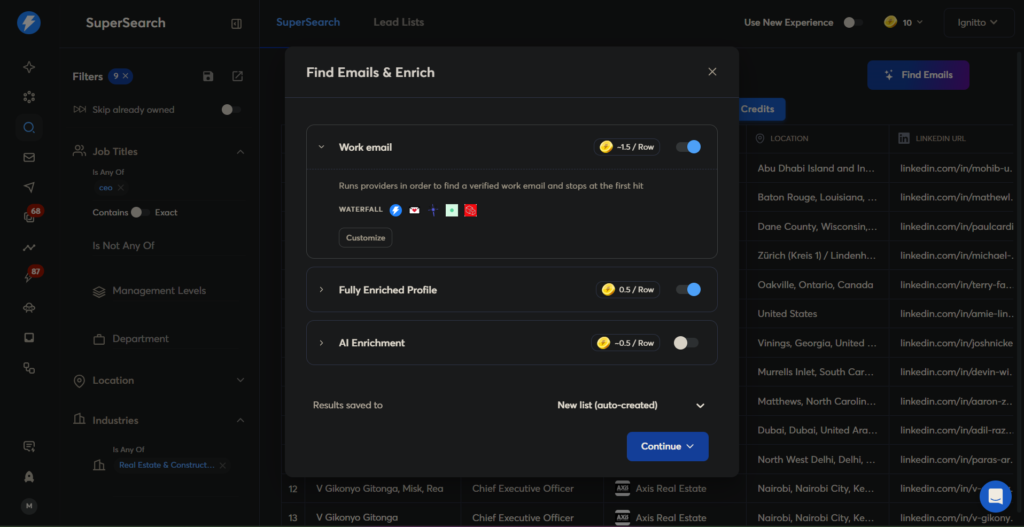
Verify Before You Export
Not every email on the internet is accurate.
Instantly.ai verifies email addresses before you add them to your campaigns, helping reduce bounce rates and protect your sender reputation.
Always prioritize verified contacts over simply collecting the largest possible list.
Save Your Lead Lists
Once you’ve found the right audience, save your search as a list.
For example:
- US Dental Clinics
- SaaS Founders
- Real Estate Agencies
- Marketing Consultants
Organizing your leads makes it much easier to personalize campaigns and measure results later.
Build Smaller Lists First
A common mistake is importing thousands of leads into your very first campaign.
Instead, start with 100–300 highly qualified prospects. This allows you to:
- Test your messaging
- Measure reply rates
- Improve your offer
- Optimize before scaling
Cold email is an iterative process. Small improvements early on often lead to much stronger results over time.
💡 Pro Tip: Spend more time refining your audience than writing your email. A well-targeted campaign with an average email will usually outperform a great email sent to the wrong people.
Step 5: Create Your First Cold Email Campaign
With your inboxes warmed up and your lead list ready, it’s finally time to build your first campaign.
A campaign in Instantly.ai is where everything comes together. It’s where you decide who receives your emails, what message they’ll see, when follow-ups should be sent, and how the platform responds when someone replies. Instead of managing each step manually, Instantly.ai brings your entire outreach process into a single workflow, making it easier to launch campaigns while staying organized.
Create a New Campaign
From the dashboard, navigate to Campaigns and click New Campaign.
You’ll be prompted to choose your sending inboxes, import a lead list, write your email sequence, and configure a few campaign settings before launching.
It’s also worth giving every campaign a clear and descriptive name. Labels such as US SaaS Founders, Dental Clinics, July, or Real Estate Outreach make it much easier to monitor performance and compare results as your outreach grows.
Import Your Leads
Once your campaign is created, select the lead list you built in the previous step.
Before moving forward, take a minute to review your contacts. Make sure names are properly formatted, email addresses are verified, duplicate records have been removed, and company information looks accurate. A clean prospect list not only improves personalization but also reduces unnecessary bounces and reporting errors later.
Write Your First Email
The goal of a cold email isn’t to make an immediate sale – it’s to start a conversation.
Rather than writing a long sales pitch, focus on creating a message that feels personal, relevant, and easy to respond to. The highest-performing cold emails are usually short, direct, and centered around a problem your prospect already faces.
A simple framework is often enough:
- Start with a personalized opening.
- Mention a relevant challenge or opportunity.
- Explain how you can help.
- End with one clear call to action.
As a general rule, try to keep your email under 150 words. Shorter emails tend to feel more authentic and are easier for busy decision-makers to read.
Personalize with AI
One of Instantly.ai’s standout features is its AI-powered personalization.
Instead of sending identical emails to every prospect, AI can generate customized opening lines using publicly available information about the recipient or their company. This helps your outreach feel more natural while reducing the time required to personalize each email manually.
For example:
Generic
Hi John, I hope you’re doing well.
AI Personalized
Hi John, I noticed your agency recently expanded into healthcare marketing, and I thought this might be relevant.
Small details like these often make the difference between being ignored and receiving a reply.
Build a Follow-Up Sequence
Very few prospects reply to the first email. That’s why every campaign should include a thoughtful follow-up sequence.
Rather than repeating the same message, each follow-up should move the conversation forward by offering additional value, sharing another insight, or simply providing a polite reminder.
A simple sequence could look like this:
Keep each follow-up concise, conversational, and respectful. The goal is to stay visible, not to become repetitive.
Review Your Campaign Settings
Before launching, take a final look at your campaign settings.
Enable email tracking, schedule messages during your audience’s business hours, randomize sending times, and make sure your daily sending limits match the warm-up stage of your inboxes. It’s also a good practice to automatically stop sending emails once a prospect replies, ensuring they don’t continue receiving follow-ups unnecessarily.
These small configuration choices help your outreach feel more natural while protecting your sender reputation over the long term.
💡 Pro Tip: Your first campaign doesn’t need to be perfect. Launch with a strong foundation, monitor your results, and improve over time. The most successful cold email campaigns are built through continuous testing – not endless tweaking before launch.
Step 6: Monitor and Optimize Your Campaign Performance
Launching your campaign is only the beginning. The real improvements happen after your emails start reaching prospects and data begins to come in.
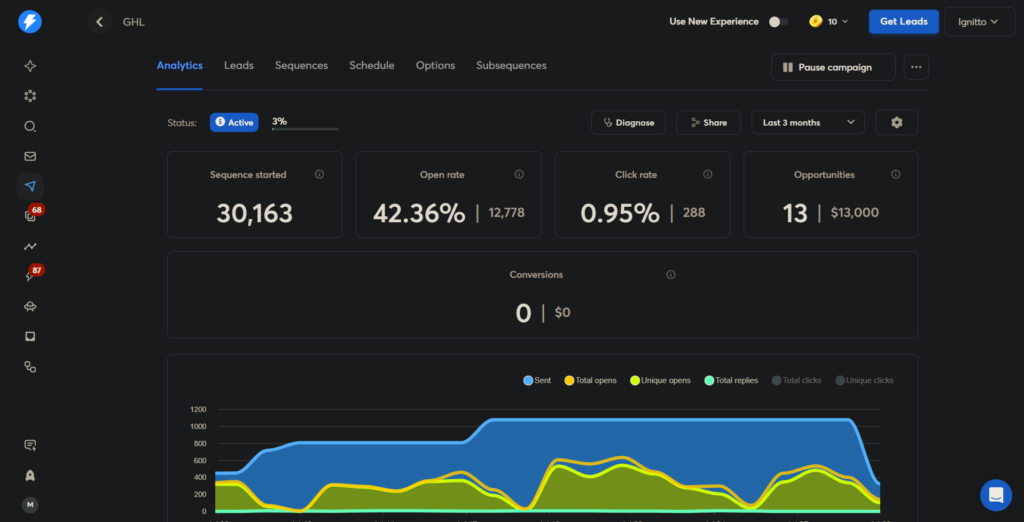
Instead of guessing what works, Instantly.ai provides detailed campaign analytics that help you understand how recipients are interacting with your outreach. By reviewing these insights regularly, you can identify what’s performing well, spot potential issues early, and continuously improve your results.
Understanding Your Campaign Analytics
Navigate to Campaigns and open the campaign you’d like to review. Instantly.ai for cold email provides a dashboard with key performance metrics that give you a clear picture of your campaign’s health.
While every business has different goals, there are a few metrics you should pay close attention to:
- Delivery Rate – The percentage of emails that successfully reached your recipients.
- Reply Rate – How many prospects responded to your emails.
- Bounce Rate – Emails that couldn’t be delivered because of invalid addresses or server issues.
- Open Rate (optional if tracking is enabled) – How many recipients opened your email.
These numbers work together to tell the story of your campaign. Rather than focusing on a single metric, look at the overall performance.
Campaign Analytics Dashboard
Focus on Replies, Not Opens
Many beginners celebrate a high open rate, but opens don’t generate revenue, conversations do.
Privacy updates from providers like Apple and Google have also made open rate tracking less reliable than it once was. Because of this, experienced outbound teams pay far more attention to reply rates and booked meetings.
If your campaign is generating consistent replies, you’re moving in the right direction – even if your open rate isn’t perfect.
Watch for Warning Signs
Analytics can also help you identify problems before they become serious.
If you notice:
- An unusually high bounce rate
- Very few replies
- Declining delivery rates
it’s worth pausing the campaign to investigate. These issues often point to poor lead quality, weak email copy, or sending too aggressively before your inboxes have built enough reputation.
Making small adjustments early can prevent larger deliverability problems later.
Test One Variable at a Time
Improving a campaign isn’t about changing everything at once.
Instead, make one change, measure the results, and repeat. This makes it much easier to understand what’s actually improving performance.
For example, you might test:
- A different subject line
- A shorter email
- A stronger call-to-action
- A new audience segment
- Different sending times
Over time, these small optimizations can significantly increase your reply rates.
💡 Pro Tip: Keep a simple record of every change you make. Tracking what you’ve tested makes it easier to identify patterns and avoid repeating unsuccessful experiments.
Step 7: Common Cold Email Mistakes to Avoid
Even with the right tools, a few common mistakes can significantly reduce the effectiveness of your outreach. Fortunately, most of them are easy to avoid once you understand what causes them.
Here are some of the biggest mistakes beginners make when using Instantly.ai – and what you should do instead.
Using Your Primary Business Email
Your business email is one of your most valuable assets. Using it for cold outreach puts your domain reputation at unnecessary risk, especially if your campaigns generate bounces or spam complaints.
Instead, create dedicated sending domains and inboxes specifically for outbound campaigns. This keeps your primary domain protected while giving you room to scale safely.
Skipping Email Warm-Up
One of the fastest ways to damage a new inbox is by sending hundreds of emails immediately after connecting it.
Always allow your inboxes to warm up before launching campaigns, and continue using Instantly.ai’s warm-up feature even after your outreach goes live. Building trust with email providers takes time, but it’s worth the investment.
Prioritizing Quantity Over Quality
Sending thousands of emails doesn’t automatically produce better results.
A smaller list of highly qualified prospects will almost always outperform a massive list of poorly targeted contacts. Spend time refining your audience before increasing your sending volume.
Quality leads generate quality conversations.
Writing Long Sales Pitches
Cold emails aren’t meant to close deals – they’re meant to start conversations.
If your email looks like a marketing brochure, most recipients won’t read it. Keep your message short, relevant, and focused on one clear problem your prospect cares about.
Your objective is to earn a reply, not explain every detail of your business.
Ignoring Campaign Data
Many people launch a campaign and never review the results.
Campaign analytics provide valuable insights into what’s working and what needs improvement. Monitor your reply rates, bounce rates, and delivery performance regularly, then make small adjustments based on real data instead of assumptions.
Continuous optimization is what separates average campaigns from exceptional ones.
💡 Pro Tip: Successful cold email isn’t about sending more emails – it’s about sending better emails to the right people, from healthy inboxes, and continuously improving your approach.
Conclusion: Is Instantly.ai Worth It?
If you’ve made it this far, you now have a complete understanding of how to use Instantly.ai to build a scalable cold email system.
From setting up your sending infrastructure and warming up your inboxes to finding qualified leads, creating personalized campaigns, and optimizing performance, each step plays an important role in generating consistent results. Cold email isn’t about sending thousands of messages – it’s about building a repeatable system that reaches the right people with the right message at the right time.
What makes Instantly.ai stand out is that it combines every essential part of outbound outreach into a single platform. Instead of switching between multiple tools for lead generation, warm-up, personalization, campaign management, and analytics, you can manage everything from one dashboard.Whether you’re a freelancer, agency owner, consultant, or part of a growing sales team, Instantly.ai provides the tools to build and scale a professional outbound process without unnecessary complexity.
Frequently Asked Questions
Is Instantly.ai good for beginners?
Yes. Instantly.ai has a beginner-friendly interface while still offering advanced features like inbox warm-up, AI personalization, campaign automation, and detailed analytics. It’s suitable for both first-time users and experienced outbound teams.
How many emails can I send per day with Instantly.ai?
The number depends on the health of your inboxes and how long they’ve been warmed up. Instead of relying on a single inbox, it’s recommended to spread your outreach across multiple warmed-up inboxes and increase your sending volume gradually.
Does Instantly.ai include email warm-up?
Yes. Instantly.ai includes a built-in warm-up feature that automatically sends and receives emails through its warm-up network to help improve sender reputation and inbox placement.
Can I use Instantly.ai to find leads?
Yes. Instantly.ai includes a built-in B2B lead database that allows you to search for prospects using filters such as industry, location, company size, job title, and more.
Is Instantly.ai worth it?
If you’re serious about cold email, yes. Rather than paying for separate tools for lead generation, warm-up, campaign management, AI personalization, and analytics, Instantly.ai combines these features into a single platform, making it a strong choice for freelancers, agencies, consultants, and sales teams.
Final Thoughts
Cold email success doesn’t come from sending more emails, it comes from building a better system.
Take the time to set up your infrastructure correctly, warm up your inboxes, target the right prospects, personalize your outreach, and improve your campaigns based on real data. Those habits will have a far greater impact than chasing shortcuts or increasing volume too quickly.
If this guide helped you, be sure to watch the full video tutorial and start building your first campaign with Instantly.ai. With the right process in place, you’ll spend less time managing outreach and more time having meaningful conversations with potential customers.
Work With Me
Building a successful cold email system isn’t just about using the right software, it’s about creating a strategy that consistently generates qualified conversations and turns them into revenue.
Over the years, I’ve helped businesses simplify their sales process by combining cold email, AI, automation, and CRM systems into one scalable client acquisition engine. Whether you’re starting from scratch or looking to improve an existing outbound strategy, my goal is simple: help you build a system that delivers predictable growth without adding unnecessary complexity.
If you’re tired of inconsistent lead generation, manual follow-ups, or disconnected tools, I’d love to help you build a system that’s designed to scale.
How I Can Help
- Cold Email Strategy & Implementation
- Instantly.ai Setup & Optimization
- GoHighLevel CRM & Automation
- AI-Powered Business Systems
- Sales Funnels & Lead Generation
- Business Process Automation
- CRM Migration & Workflow Optimization
Every business is different, which is why I don’t believe in one-size-fits-all solutions. If you’d like a second opinion on your current outreach, need help setting up Instantly.ai, or want to build a scalable client acquisition system, let’s talk.
During our strategy session, we’ll review your current process, identify opportunities for improvement, and create a practical roadmap tailored to your business goals.
Affiliate Disclosure
Some of the links in this article are affiliate links. This means I may earn a commission if you make a purchase through them, at no extra cost to you. I only recommend products and services I trust and believe provide value. Thank you for your support.
Read more articles on our webiste Iloveghl






Be First to Comment